As we move into 2026, I've been reflecting on the many Network Operations Center (NOC) assessments our team has conducted recently through our operations consulting service. One thing stands out clearly: while NOCs are critical for maintaining IT infrastructure and services, many are held back by outdated processes and tools.
After analyzing the trending problem areas we've uncovered in our recent consulting work, we've identified five key areas where modernization can have the most significant impact:
- Event Management
- Incident Management
- Scheduled Maintenances
- Configuration Management Database (CMDB)
- Runbooks
Let me walk you through each one, sharing what we've seen and what we typically recommend.
If any of these areas are known problem areas for your NOC, get in touch with us to discuss a potential NOC Operations Consulting project. We've helped NOCs, large and small, diagnose their operational problems and get the blueprint they need to be efficient while hitting SLAs consistently.
1. Event Management: Taming the Alert Flood
Event management is the cornerstone of NOC operations, yet it's an area where many organizations falter. Our assessments consistently find NOCs grappling with manual monitoring processes, fragmented monitoring systems, and ineffective event correlation. These issues often lead to alert floods, making it difficult for NOC staff to identify and prioritize critical issues.
We recently walked into a financial services company's NOC and saw analysts juggling two separate event consoles — one for application performance alerts and another for infrastructure alerts. This fragmented approach led to significant delays in correlating related events and identifying the full scope of incidents. In another case, a telecommunications company received over 51,000 events per quarter, with analysts struggling to correlate these alerts manually.
This overwhelming volume of uncorrelated alerts made it challenging to identify root causes and related issues, often leading to delayed response times and increased mean time to repair (MTTR).
Our modernization recommendations
Here's what we usually recommend.
.png?width=1273&height=450&name=imageonline-co-roundcorner%20(4).png)
Implement a single pane of glass.
Consolidate all your alerts into one view. We often suggest an ITSM platform that can integrate various monitoring tools. Make sure it can handle your data volume and variety. For instance, our Ops 3.0 platform implemented a unified view that ingests alerts from various sources, including infrastructure monitoring tools like LogicMonitor and application performance monitoring systems. This approach allows NOC staff to see all relevant alerts in one place, significantly reducing the time spent switching between systems.
Deploy AI-powered correlation.
This is challenging operationally but a game-changer. An AIOps platform can learn patterns and group-related alerts. Imagine automatically correlating latency, packet loss, and service degradation alerts into a single incident pointing to a core router problem.
In practice, this might involve configuring your AIOps tool to recognize that when it sees a cluster of network-related alerts in a specific geographic area within a short time frame, it's likely indicative of a single root cause. The system can then automatically create a single incident ticket rather than flooding the NOC with multiple related alerts.
Define clear prioritization rules.
Work with your stakeholders to create a matrix combining technical severity and business impact. Don't forget time-based factors — a P2 issue during normal hours might need to be P1 during peak trading times for a financial organization.
For example, you might define a rule that says any issue affecting the core trading platform during market hours is automatically P1, while the same issue outside of trading hours might be P2. Similarly, an issue affecting a small subset of non-critical internal systems might be P3 or P4.
Automate initial triage.
Set up scripts to gather diagnostic info when an event is detected. Configure your system to assign priorities automatically based on your rules. For instance, when a server alert comes in, you might have a script that automatically checks CPU usage, memory usage, disk space, and recent log entries. This information can be automatically attached to the alert, giving the NOC analyst a head start on troubleshooting.
Standardize handling procedures.
Create detailed, step-by-step runbooks for common events and integrate them into your ticketing system. This ensures consistency across shifts and analysts. For example, for a "high CPU usage" alert, your runbook might include steps like:
- Verify the alert isn't a false positive.
- Check which processes are consuming CPU.
- Determine if this is a known issue with a standard resolution.
- If not, escalate to the appropriate team with specific information gathered.
|
2. Incident Management: From Chaos to Coordination
Effective incident management is crucial for minimizing downtime and restoring services quickly. However, in our assessments, we frequently encounter NOCs struggling with inconsistent incident handling processes, poor prioritization, and limited visibility into incident status and progress.
One particularly striking example comes from an e-commerce company's NOC we assessed. Major incidents were primarily managed through a mishmash of emails and chat messages, with no consistent process for declaring incidents, assembling response teams, or tracking actions taken.
This ad-hoc approach led to confusion, delays in response, and difficulty in tracking the progress of incident resolution. In another case, a software company's NOC was using a distributed ownership model for cases rather than a shared ownership model. This meant that if an analyst who owned a particular case wasn't on shift, updates and progress on that case would stall, sometimes impacting critical customer projects.
These examples underscore the importance of having a well-structured, centralized incident management process. To address these challenges, we typically suggest:
Our modernization recommendations
.png?width=1273&height=450&name=imageonline-co-roundcorner%20(1).png)
Implement a formal incident process (if you haven't already).
Base it on ITIL's best practices. Develop a comprehensive policy covering the entire incident lifecycle. Clearly define severity levels, response procedures, and escalation guidelines. This should include specific criteria for declaring major incidents, roles and responsibilities during incident response, and communication protocols.
For instance, you might define that any outage affecting more than 20% of your customer base automatically triggers major incident procedures.
Define clear incident priorities.
Work with your business stakeholders to create a prioritization scheme that aligns with business impact. Implement a matrix that considers both technical severity and business impact.
This might look like:
- P1: Complete outage of a critical service affecting all users
- P2: Partial outage of a critical service or complete outage of a non-critical service
- P3: Degraded performance of a service affecting some users
- P4: Minor issues affecting a small number of users or internal systems
Automate your escalations.
Set up workflows based on incident priority and SLAs. Implement automatic notifications and time-based escalation rules. For example, you might configure your ITSM system to automatically escalate a P1 incident to the next level of support if it's not acknowledged within 5 minutes or to senior management if it's not resolved within 30 minutes.
Centralize incident tracking.
Deploy a platform that serves as a single source of truth for all incident-related activities. This ensures everything — updates, communications, actions — is logged in one place. In practice, this means all communication about an incident should happen within the ticket or incident management tool. If offline discussions occur, their outcomes should be immediately documented in the central system.
Conduct thorough incident reviews.
Implement a formal post-incident review process. Use a structured format covering the timeline, root cause analysis, response effectiveness, and lessons learned. These reviews should result in actionable items, whether that's updating runbooks, adjusting monitoring thresholds, or implementing new safeguards to prevent similar incidents in the future.
|
3. Scheduled Maintenances: Preventing the Preventable
Proper management of scheduled maintenance is essential for minimizing unexpected outages and ensuring smooth operations. However, in our assessments, we often find NOCs lacking robust processes in this area.
One particularly memorable case was a managed service provider's NOC, where maintenance windows were tracked in spreadsheets with no integration to monitoring or ticketing systems. This led to false alerts and confusion during maintenance activities, as the NOC staff had no easy way to correlate ongoing maintenance with incoming alerts.
In another instance, a SaaS provider we worked with had no formal Change Advisory Board (CAB) process, leading to poorly planned changes that often resulted in unexpected service disruptions.
Our modernization recommendations

Implement a centralized system.
Deploy a change management system integrated with your monitoring and ITSM platforms. It should create a centralized calendar accessible to all stakeholders. This system should allow you to schedule maintenance windows, associate them with specific infrastructure components, and automatically suppress alerts for those components during the maintenance window.
Establish a CAB process.
Implement a structured process for reviewing and approving changes. Define clear criteria for what requires CAB review versus standard change processes.
For instance, you might decide that any change affecting customer-facing services requires CAB approval, while routine patching of internal systems can follow a standard change process.
Define clear scheduled maintenance policies.
Create maintenance window policies and communication procedures. Develop a template outlining who needs to be notified, when, and how for different types of activities. This might include rules like "All customer-facing maintenance must be communicated at least 7 days in advance" or "Any maintenance affecting more than 50% of infrastructure requires executive approval."
Automate testing.
Implement automated pre and post-change validation testing — and develop standardized test scripts for common changes.
For example, if you're patching a server, your automated test might check that all critical services start correctly, that key performance metrics are within expected ranges, and that sample transactions complete successfully.
Require back-out plans.
Make documented back-out plans mandatory for all changes. Create templates to ensure consistency and completeness. A good back-out plan should include specific steps to revert the change, estimated time required for rollback, and criteria for deciding when to initiate the back-out procedure.
|
4. CMDB: Your Single Source of Truth
A comprehensive and accurate CMDB is critical for effective IT service management, yet many organizations struggle to implement and maintain one. In our assessments, we consistently encounter challenges such as incomplete or outdated CI data, lack of defined relationships between CIs, and poor integration with other ITSM processes.
In one particularly striking case, we found a large enterprise NOC whose CMDB contained less than 60% of its actual infrastructure components. This severely limited the NOC's ability to assess incident impact and perform root cause analysis effectively.
Another organization we assessed was using a home-grown tool to provide stack configuration information for its customers. However, this tool was not integrated with its monitoring systems, requiring analysts to manually search for information during incidents, often leading to delays and inaccuracies.
Our modernization recommendations
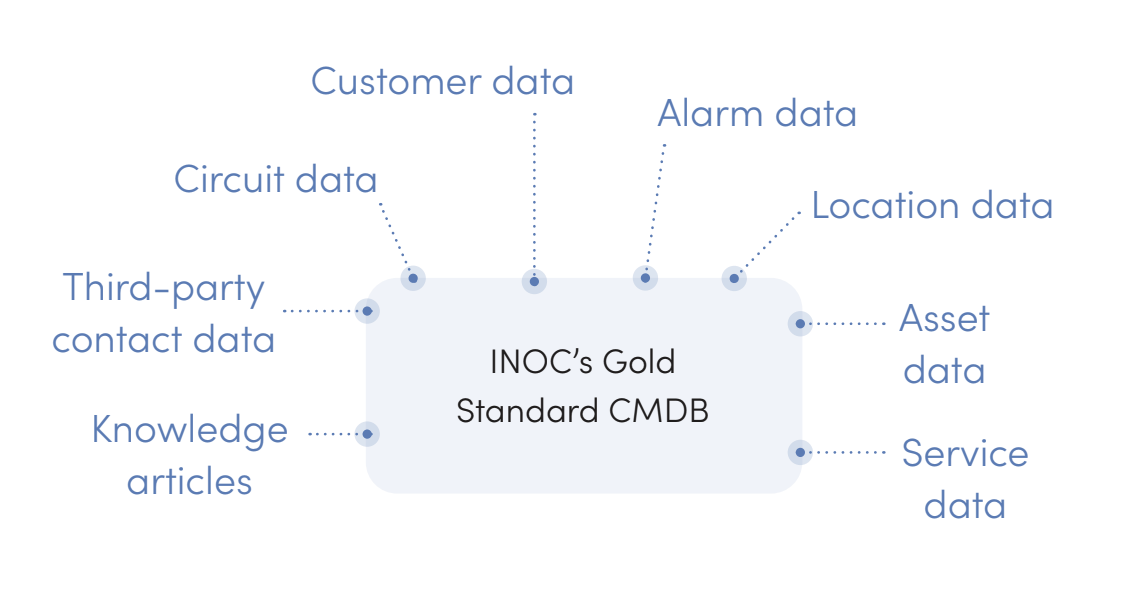
Automate discovery if possible.
Implement tools that can continuously scan your environment and update the CMDB automatically. This reduces reliance on manual updates and improves accuracy. These tools should be able to discover and catalog not just physical assets but also virtual machines, cloud resources, and software applications.
Establish CI relationships.
This is crucial for effective impact analysis and problem correlation. It allows your team to understand the implications of incidents or changes quickly.
For example, your CMDB should be able to show that Server A hosts Application B, which is critical for Business Process C. This allows you to assess the business impact of a server issue quickly.
Integrate processes.
Link your CMDB with event, incident, and change management processes. This ensures it's an active part of day-to-day operations, not just a static repository. For instance, when a change ticket is created, it should automatically link to the affected CIs in the CMDB. When an incident occurs, the ticket should show the impacted CIs and their relationships.
Implement clear governance.
Define roles and responsibilities for maintaining CMDB accuracy. Designate owners, establish updated procedures, and create policies for adding or modifying CIs. This might include rules like "All new production servers must be added to the CMDB within 24 hours of deployment" or "CI owners must review and confirm the accuracy of their CIs quarterly."
Conduct regular database audits.
Establish a cadence for CMDB reviews and use automated tools to flag discrepancies or outdated information. Consider implementing automated reconciliation processes that compare discovered assets against the CMDB and flag any discrepancies for review.
|
5. Runbooks: Your Operational Playbook
Well-designed and maintained runbooks are essential for consistent and efficient incident response, yet many NOCs struggle with outdated or ineffective documentation. Our assessments often find runbooks containing outdated procedures, lacking standardization across different technologies or services, and poorly organized across various systems.
For example, in assessing a healthcare IT provider's NOC, we found critical application support procedures scattered across wikis, PDFs, and tribal knowledge. This fragmentation led to inconsistent troubleshooting approaches and delayed resolutions. In another case, a financial services company had runbooks that were so outdated and poorly organized that NOC staff often ignored them altogether, relying instead on their own knowledge or ad-hoc communication with other team members.
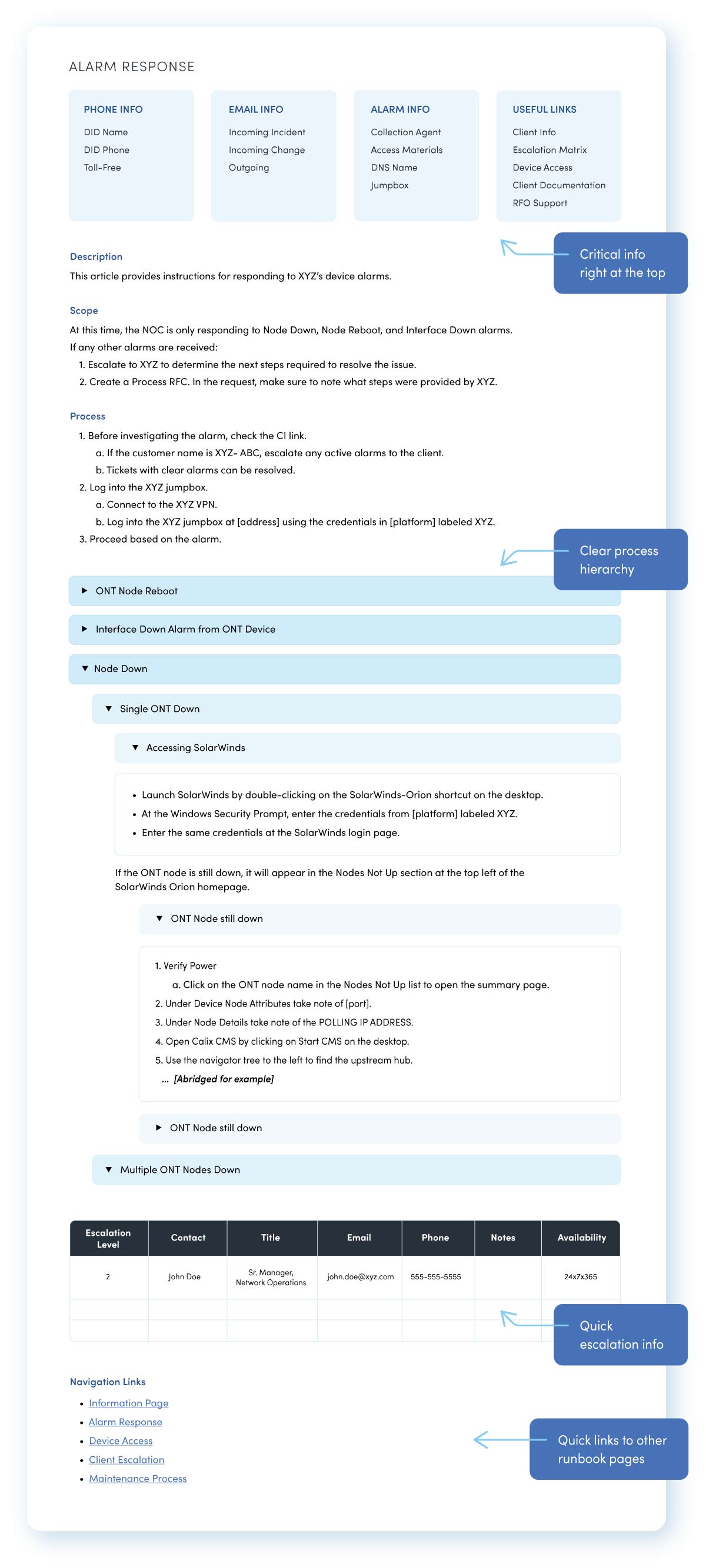
Here's a templated example of our NOC runbooks:
Our modernization recommendations
.png?width=1273&height=450&name=imageonline-co-roundcorner%20(3).png)
Centralize your knowledge management.
Implement a platform for all runbooks and procedures. This ensures easy access and consistency across all documentation. This platform should be searchable, version-controlled, and integrated with your ITSM system.
Standardize formats.
Develop templates and style guides for runbook creation. This ensures consistency and completeness, making it easier for staff to find and use information quickly. A good runbook template might include sections for:
- Alert/Incident Description
- Initial Assessment Steps
- Troubleshooting Procedures
- Escalation Criteria and Contacts
- Resolution Steps
- Verification Procedures
Integrate with workflows.
Link runbooks directly into your ticketing and workflow systems. This allows staff to access relevant procedures directly within the context of an incident. For example, when an alert for a specific application comes in, the ticket should automatically include a link to the relevant runbook.
Implement regular reviews.
Establish a formal process for reviewing and updating runbooks regularly, especially after significant changes to systems or procedures. Consider assigning "owners" to each runbook who are responsible for its accuracy and completeness.
Leverage automation.
Here at INOC, we use automation to create and maintain runbooks based on actual incident response actions. This helps ensure they reflect current best practices and stay up-to-date. For instance, you might implement a system that captures the steps taken to resolve an incident and automatically suggests updates to the relevant runbook.
|
Final Thoughts and Next Steps
Modernizing your NOC operations across these five critical areas—event management, incident management, scheduled maintenance, CMDB, and runbooks—can dramatically improve your ability to prevent and rapidly resolve issues, minimize downtime, and deliver high-quality IT services to your organization.
Whether you're working to implement these practices or looking to enhance your existing NOC operations, achieving and maintaining operational excellence requires both expertise and dedicated resources. INOC offers two comprehensive solutions to help organizations maximize their NOC capabilities:
Our award-winning NOC support services, powered by the INOC Ops 3.0 Platform, provide comprehensive monitoring and management of your infrastructure through a sophisticated multi-tiered support structure. This advanced platform combines AIOps, automated workflows, and intelligent correlation to help you:
- Achieve maximum uptime through proactive monitoring and accelerated incident response
- Reduce manual intervention with automated event correlation and ticket creation
- Scale your support capabilities without the complexity of building internal NOC infrastructure
- Access real-time insights through a single pane of glass for efficient incident and problem management
- Leverage our deep expertise across technologies while maintaining complete visibility through our client portal
Our consulting team provides tactical, results-driven guidance for organizations looking to optimize their existing NOC or build a new one from the ground up. We help you:
- Assess your current operations and identify opportunities for improvement
- Develop standardized processes and runbooks that enhance efficiency
- Implement best practices for event management, incident response, and problem management
- Design scalable operational frameworks that grow with your business
- Transform your NOC into a proactive, high-performance operation
Both services are backed by INOC's extensive experience serving enterprises, communications service providers, and OEMs worldwide. Our team brings proven methodologies and deep technical expertise to help you achieve your operational goals, whether through direct support or strategic guidance.



-images-0.jpg?height=2000&name=ino-WP-NOCPerformanceMetrics-01%20(1)-images-0.jpg)




-images-0.jpg?width=200&height=259&name=ino-WP-NOCPerformanceMetrics-01%20(1)-images-0.jpg)