

In case your time is short
Most NOC teams operate with limited visibility: basic ticket counts and response times that don’t actually explain what’s happening in their environment.
Without comprehensive, drill-down reporting, teams are effectively flying blind, stuck in reactive firefighting instead of proactive operations. Strong reporting changes that provide accountability, surface trends, enable root cause analysis, improve efficiency, and clearly demonstrate the business value of NOC services.
Our approach centers on a three-tier reporting model (standard, optional, and custom) that delivers deep, actionable insight across tickets, SLAs/SLOs, call performance, asset behavior, and incident patterns.
The emphasis isn’t just on dashboards, but on transparency and usability (being able to trace every metric back to individual tickets and uncover meaningful patterns over time). When used properly in regular reviews and planning, this level of reporting allows teams to reduce incidents, optimize infrastructure, hold vendors accountable, and continuously improve operations with real data rather than assumptions.
Talk to us if you're interested in seeing the kind of NOC reporting we can offer.
When you're evaluating Network Operations Center (NOC) service providers or trying to understand how well your current NOC is performing, reporting capabilities often don't get the attention they deserve.
But the cliche is true: if you can't measure it, you can't manage it. And if your NOC can't show you what's happening in your infrastructure with clarity and precision, you're essentially flying blind.
At INOC, we've spent years refining our reporting approach, and I want to walk you through exactly what comprehensive NOC reporting looks like today.
Why Good Reporting Matters So Much in the NOC
.jpg?width=1273&height=450&name=121813_INOC_0521%20(1).jpg)
Before we dive into the specific reports, let's talk about why this matters. Most ITOps or NOC teams come to us without meaningful reporting in place.
They might have some basic ticket counts or response time metrics, but they don’t have the depth needed to really understand what's happening in their environment. This blindness keeps them stuck in perpetual firefighting mode.
Good NOC reporting serves multiple critical functions that help to break that cycle:
|
A Three-Tier Reporting Approach
Since different teams need different levels of reporting, we’ve tiered our reporting program to fit each organization we work with.
1. Standard reportsThese are our core reports that integrate seamlessly with all client needs and require no customization. They're included in our standard contract and are meticulously maintained across our entire client base. |
2. Optional reportsDeveloped for unique client requirements, these reports go beyond our standard offerings and can be added with a contract addendum. When we improve these reports, all clients using them benefit from the updates. |
3. Custom reportsTailored exclusively to specific client objectives, these reports are designed with precision for individual use cases and maintained in accordance with specific requests and business development approval. |
All of these reports are accessible through our client portal and are highly interactive. You can drill down into the data to see individual tickets, filter by date ranges, and explore the details behind the numbers.
I’ll quickly break down the kinds of reports we include in each tier.

Standard Reporting: The Foundation of Service Visibility
Let’s start with the standard reporting suite. These are the reports all our clients have access to, providing comprehensive visibility into NOC performance and infrastructure health. Open them in a new tab or window to see them full-size.
Service KPIs and ticket trends (like Time to Ticket)
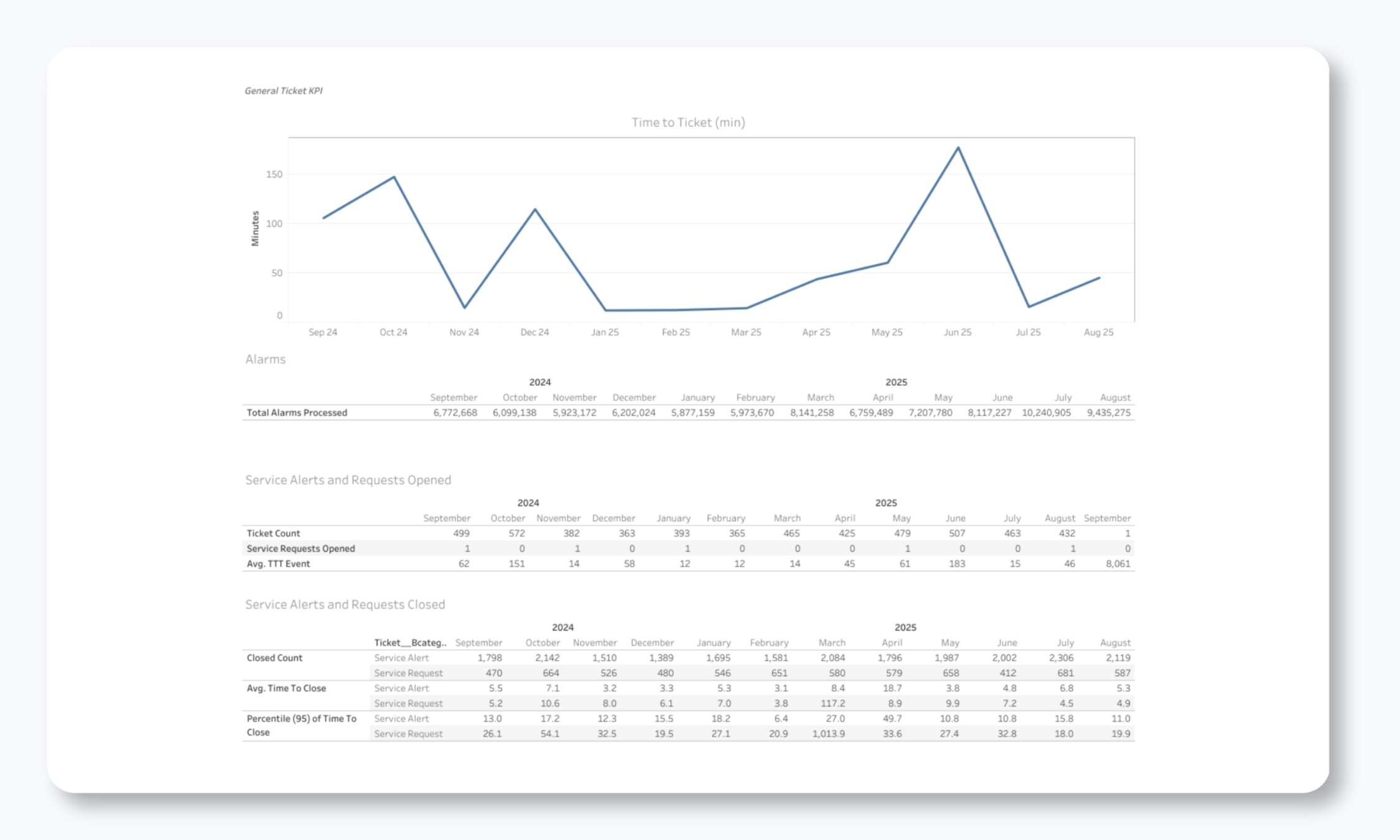
This is your command center view: the first place most clients look when they log into the portal. This dashboard shows you:
- Total tickets opened and closed over the past few months
- Current open ticket count
- Breakdown by ticket type (Monitoring, Change, Problem, etc.)
- Tickets currently open by category
The power here is in the trending. You can immediately see whether ticket volume is increasing or decreasing, whether a backlog is building, and which types of issues are most common in your environment.
Monthly Ticket Report
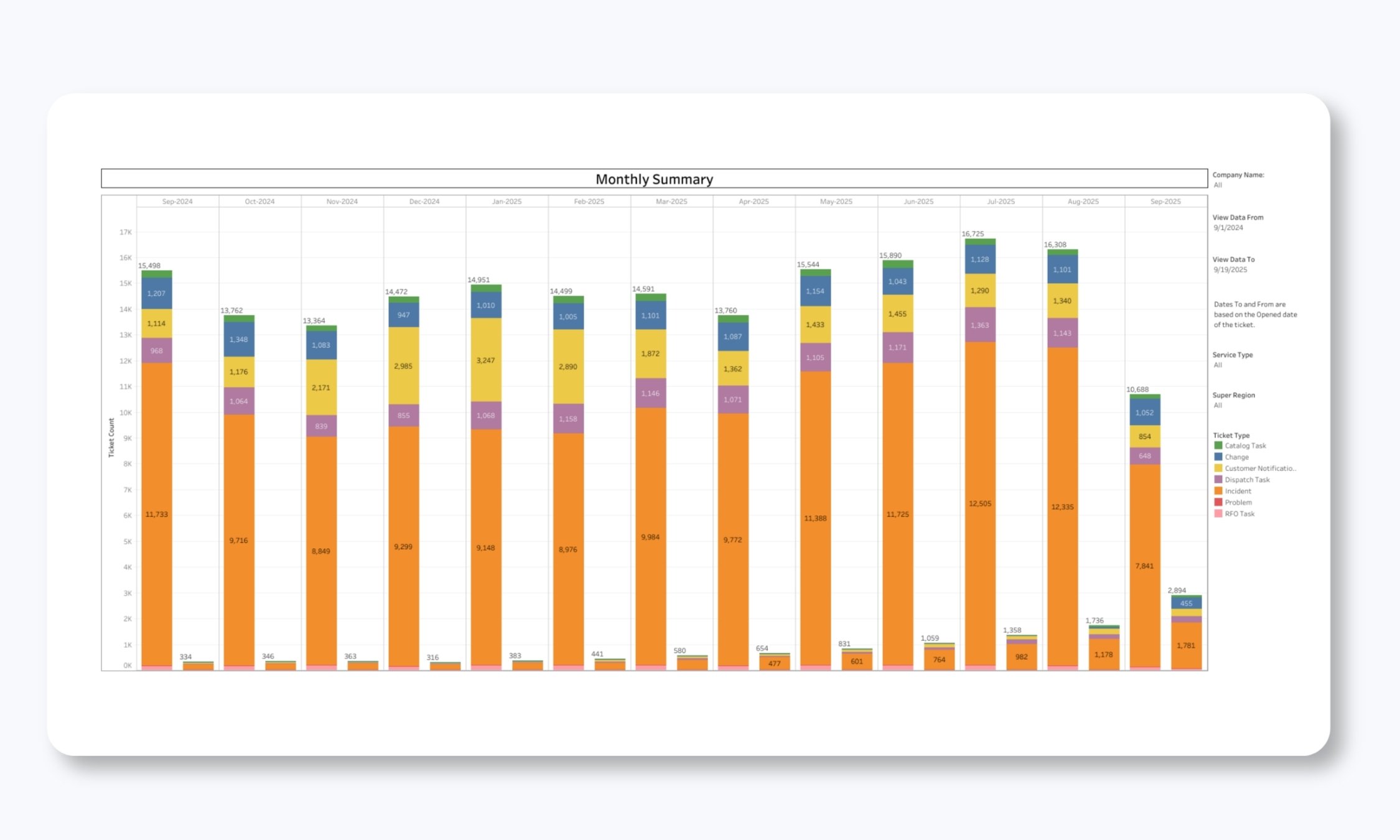
Our Monthly Ticket Report gives an even more detailed breakdown by ticket type and open/closed status. This report includes full drill-down capability, so you can click any data point to see the actual tickets that make up that number.
This transparency is critical! You're never wondering what's behind a statistic, which is one of the prime complaints we hear about prior NOC service providers: the numbers look good, but service feels poor.
Resolution category analysis
One of the most valuable aspects of our reporting is how we categorize ticket resolutions. We use extensive resolution codes that identify whether issues were caused by:
- Client infrastructure (hardware, software, CPE issues)
- Carrier or vendor problems
- Power issues (commercial power outages)
- Scheduled or non-scheduled maintenance
- Configuration changes
- Security events
- Or if no trouble was found
Resolution Category/Subcategory
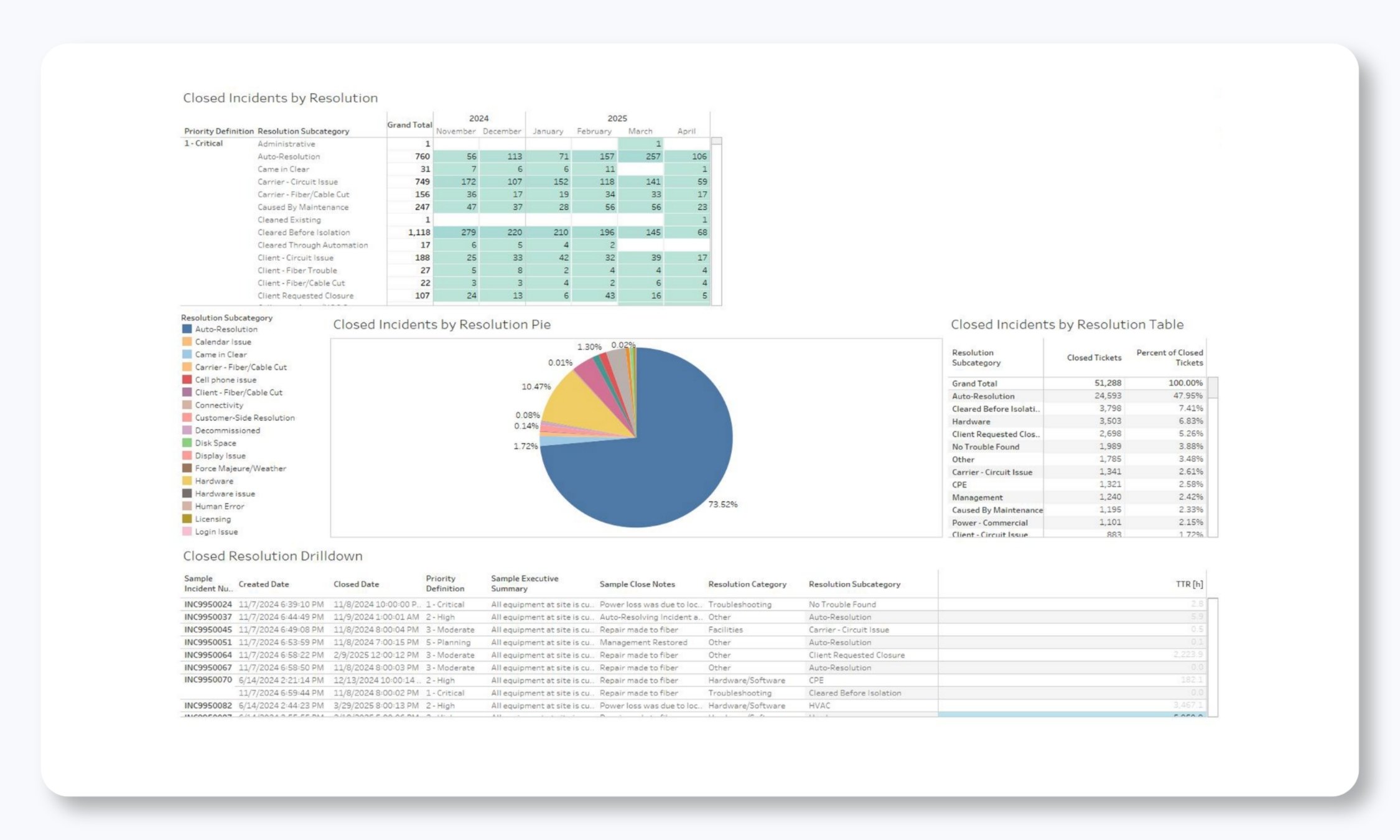
The Resolution Category/Subcategory report shows you the Reason for Outage (RFO) for incidents. This is incredibly valuable for identifying chronic problems. If you're seeing repeated hardware failures on specific devices, or if a particular carrier is causing frequent disruptions, this data makes it obvious. You can then take proactive steps, like replacing aging equipment, escalating issues with vendors, or adjusting monitoring thresholds.
Resolution category analysis
Understanding when incidents occur is just as important as understanding what caused them. Our monitoring ticket reports break down incident creation by:
- Priority level (P1, P2, P3, P4/P5)
- Day of the week
- Hour of the day
Heat Map of Created Tickets
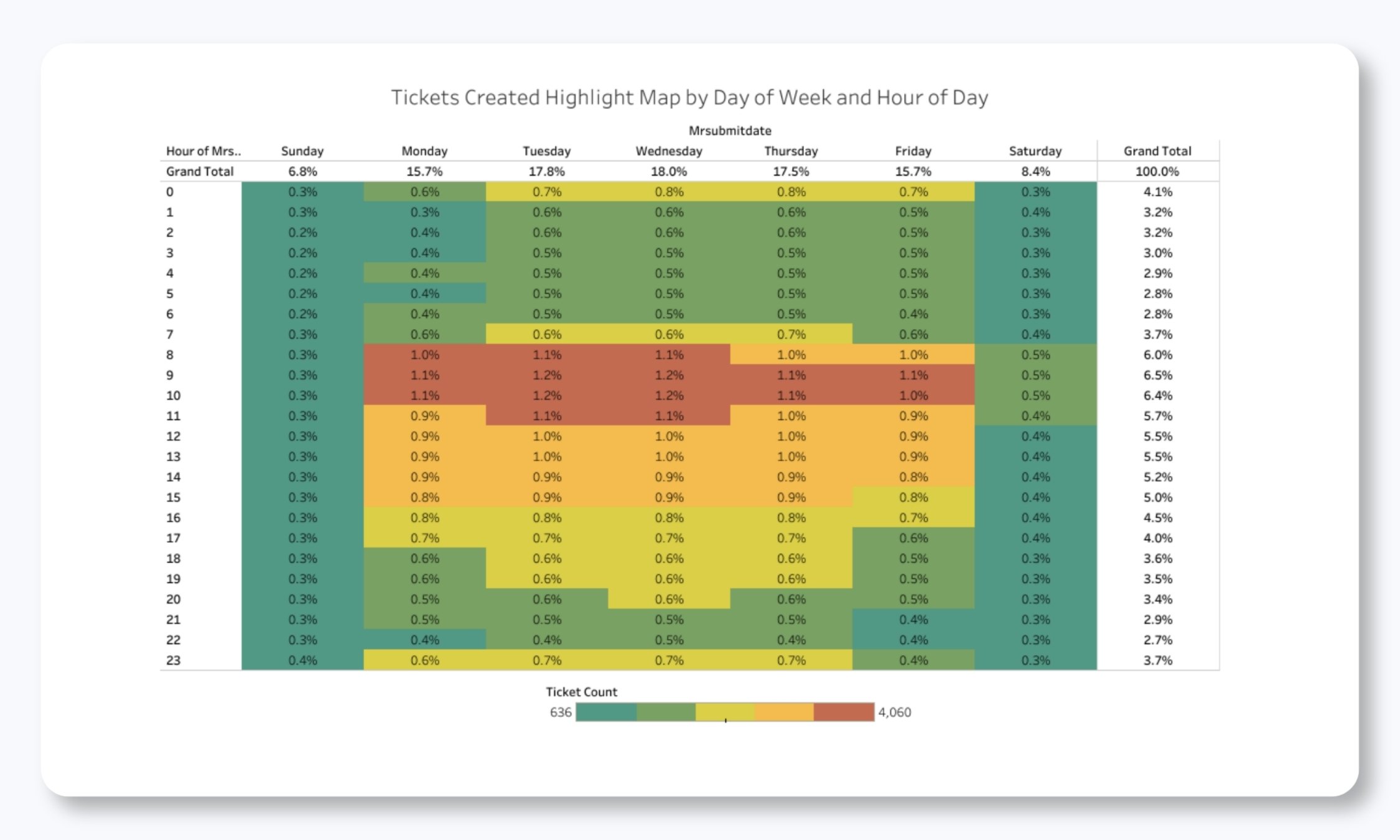
This heat map visualization makes patterns immediately obvious. It’s one of the most powerful and clear operational reports we present, and it sheds light on problems that are almost always hidden.
You might discover that P1 (the highest priority) incidents spike on Tuesday mornings after weekend maintenance windows, or that P3 tickets cluster during business hours when users are most active. This kind of insight helps with staffing decisions, maintenance scheduling, and proactive monitoring adjustments. It’s incredibly actionable data.
Monitoring Incidents by Priority and Frequency
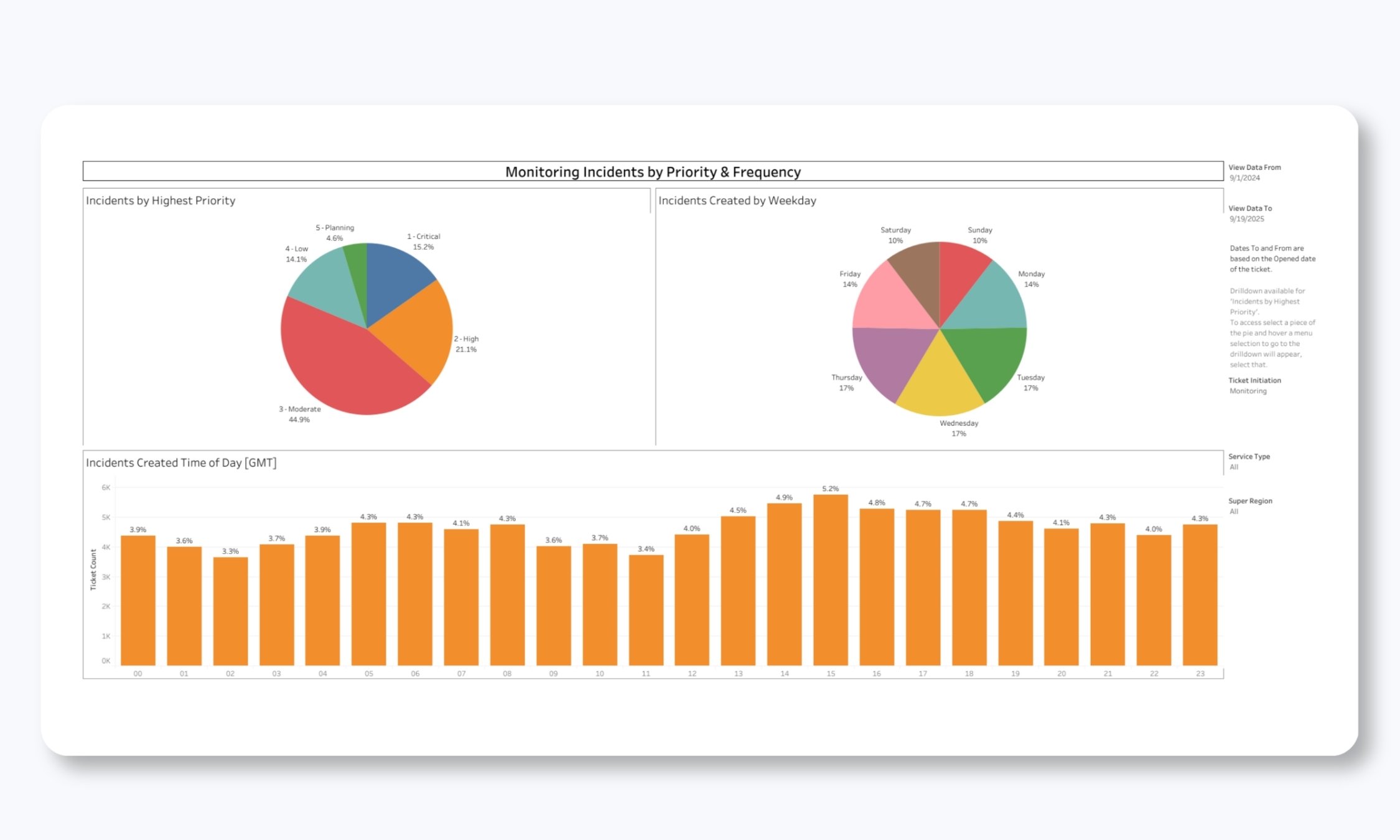
The frequency analysis shows you not just when tickets are created, but how their priority levels distribute across time periods. This helps you understand your true incident profile. You can finally answer questions that, for most teams, were previously unanswerable.
-
For example, are most of your issues critical, or are they lower-priority items that can be batched and addressed during business hours?
Every one of these reports includes drill-down capability. Simply click a specific time period or priority level to see the individual tickets that contributed to that data point.
SLA/SLO Reporting
Service Level Agreements are the formal commitments between our teams, but we go well beyond basic SLA reporting. We track Service Level Objectives (SLOs) that provide much deeper insight into NOC performance.
Standard Monthly SLA/SLO Metrics
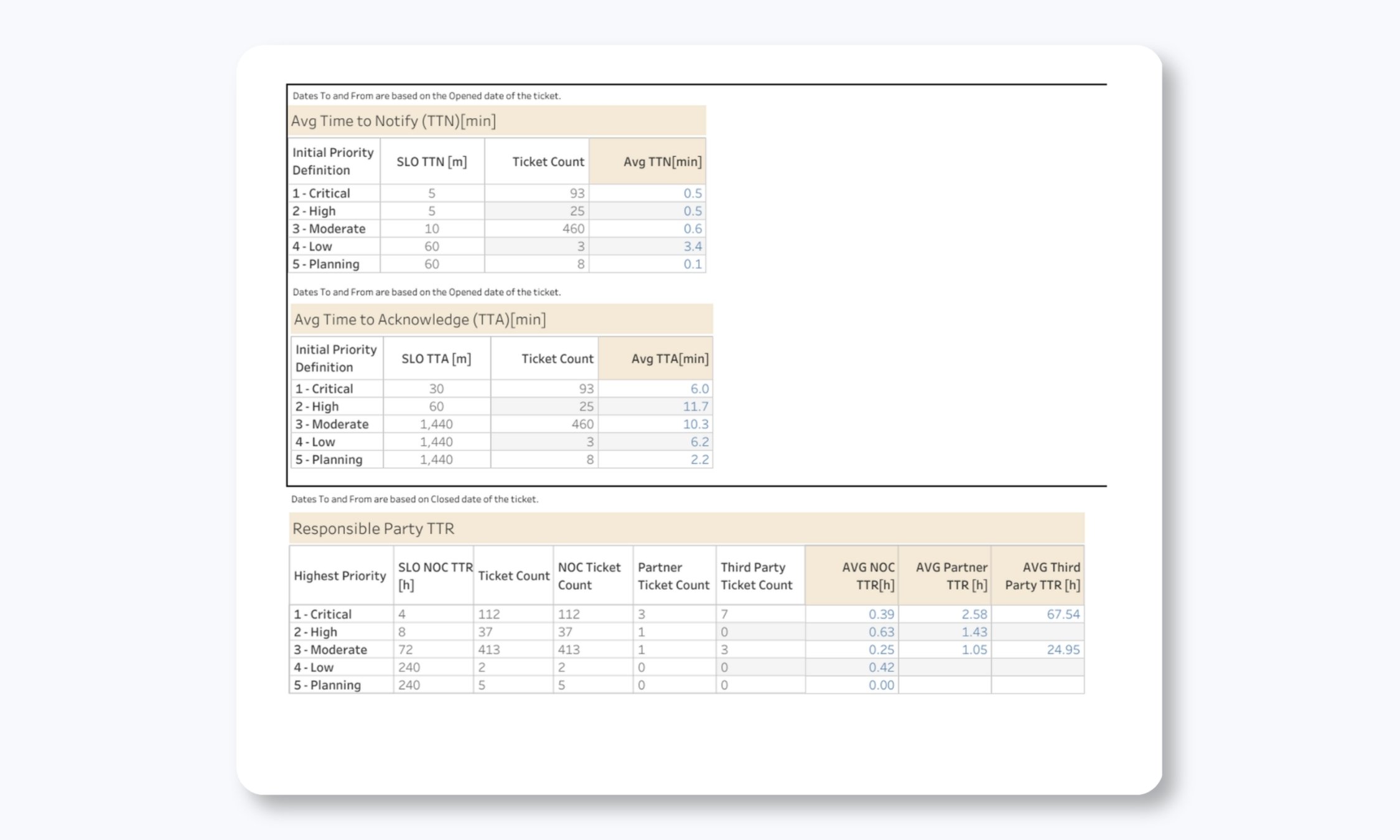
Our Monthly SLA/SLO Report tracks all the metrics you'd expect:
- Response times by priority level
- Average and maximum hold times for calls
- Notification and escalation times
- Time to close tickets
- Call answer performance
But we don't stop there. We track several advanced metrics that most NOC providers don't measure:
|
Compliance reports show you exactly how the NOC is performing against established SLOs. They're accountability tools that demonstrate whether we're delivering on our commitments.
Time to Notification (TTN) Compliance
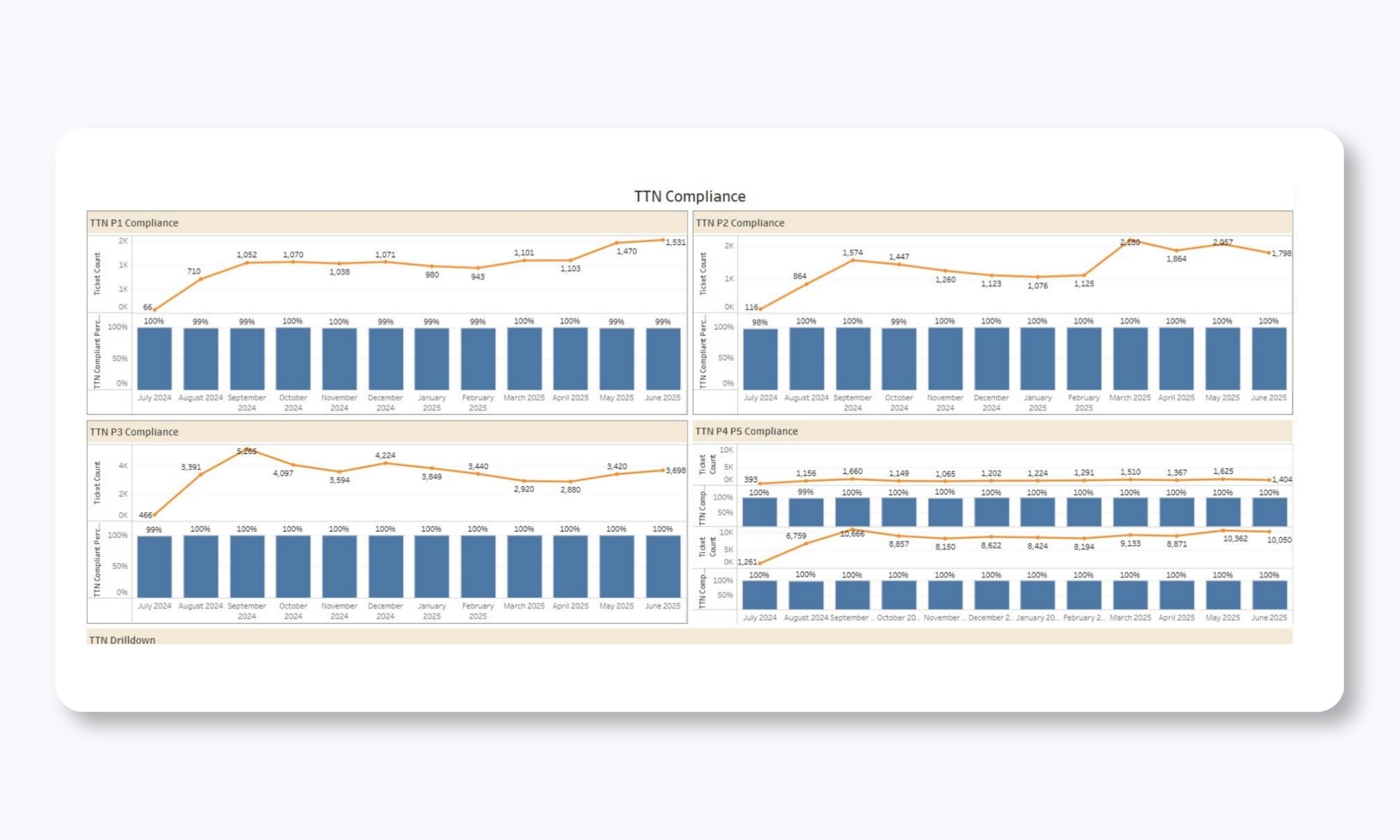
This report shows our performance in notifying you when incidents occur, broken down by priority level. For each priority (P1, P2, P3, P4/P5), you can see:
- Monthly ticket counts (the orange line)
- Compliance percentage (the blue bars)
- Average TTN in minutes
What makes this powerful is the granularity. You're not just seeing an overall compliance number. You can see month-by-month performance trends and identify any degradation patterns that need attention.
The drill-down functionality lets you click into any month and priority combination to see the specific tickets, so if compliance dips in a particular period, you can investigate exactly what happened.
Time to Action (TTA) Compliance
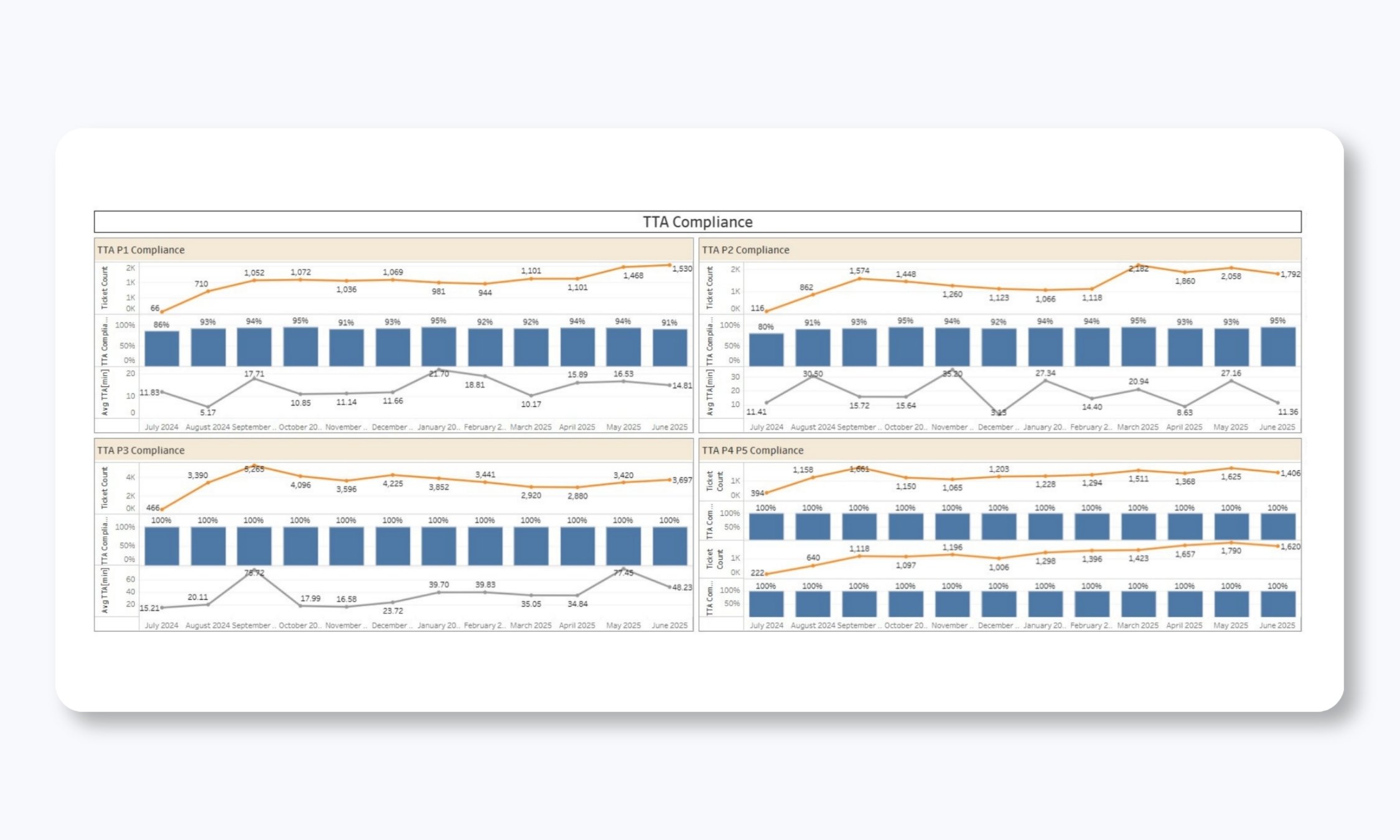
Time to Action measures how quickly we actually begin working on an incident after it's created. This is distinct from notification time. It's about when troubleshooting and resolution efforts begin.
Again, you get the complete picture here:
- Ticket volumes over time
- Compliance percentages by priority
- Average TTA in minutes
- The ability to drill down to individual tickets
Across all priorities, you can see that we consistently maintain near-perfect compliance (often 100% or close to it), with average TTA times measured in minutes or seconds for critical issues.
Average Time Metrics Deep Dive
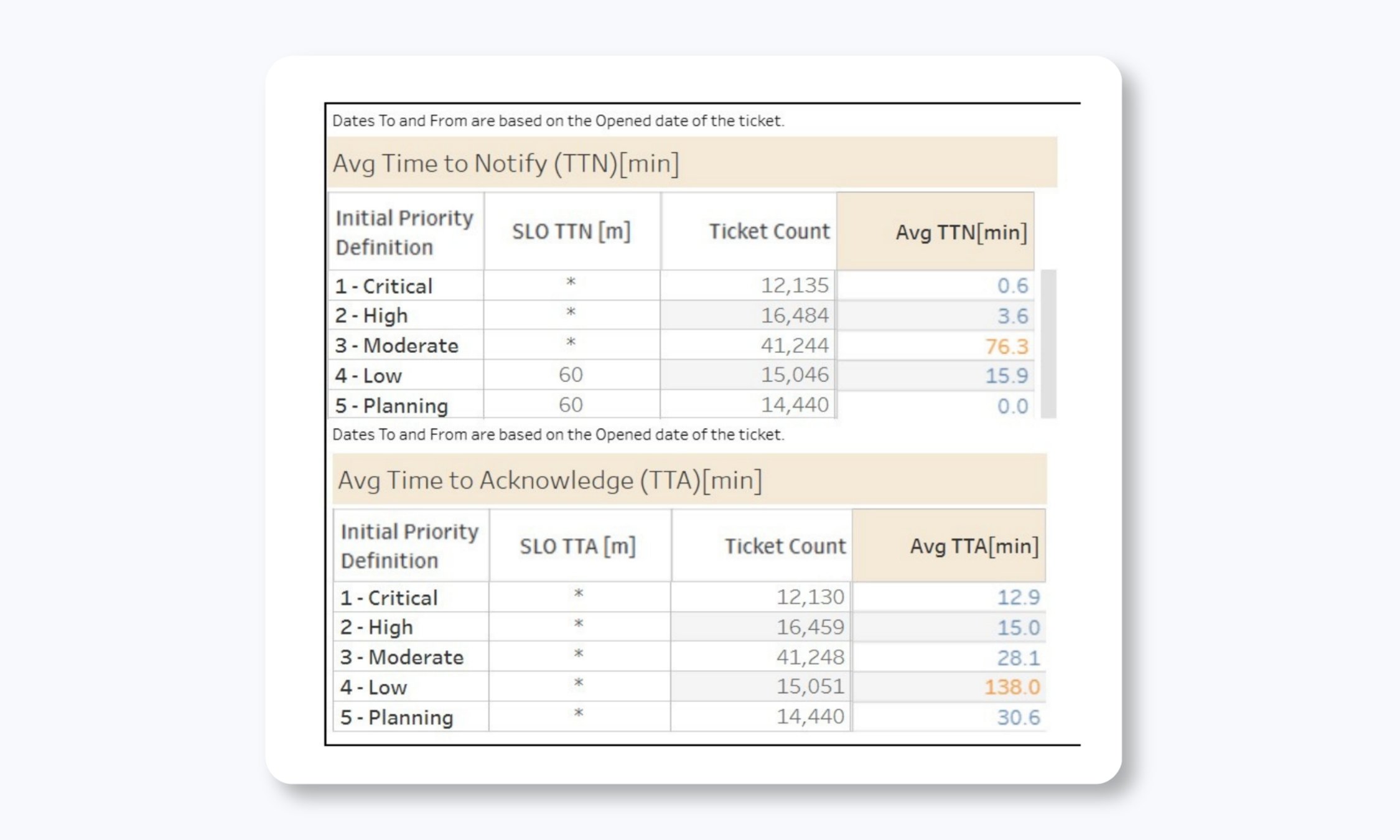
While compliance percentages tell you whether we're meeting SLO thresholds, average time metrics show you how fast we're actually performing. This report displays:
- Average TTN across all priority levels
- Average TTA across all priority levels
- Trends over time
You might be in compliance with your SLO (say, responding to P1 incidents within 5 minutes), but if your average is 4.5 minutes, you're cutting it close. If your average is 45 seconds, you've got healthy headroom. This data helps you understand not just whether standards are being met, but by what margin.
Time to Close
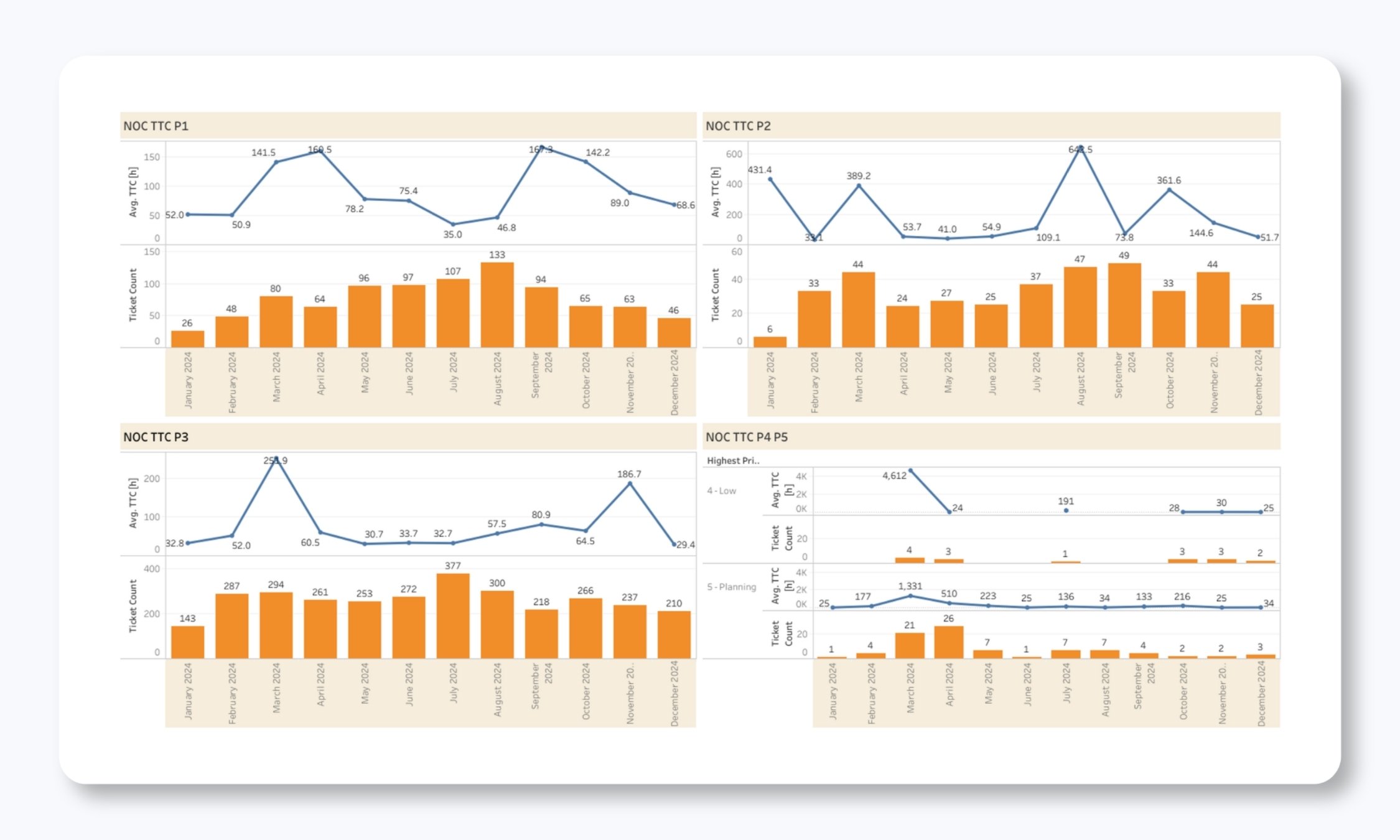
Time to Close tracks the complete lifecycle of a ticket from when it’s created through final resolution and closure. This metric encompasses all activities: NOC troubleshooting, vendor escalations, client actions, and administrative closure.
This is important because it shows the full picture of incident duration, not just the NOC's portion. If you're seeing long time-to-close metrics but fast time-to-action and time-to-restore, it might indicate that tickets are staying open for administrative reasons, which suggests an opportunity to streamline closure procedures.
SLA Exclusions
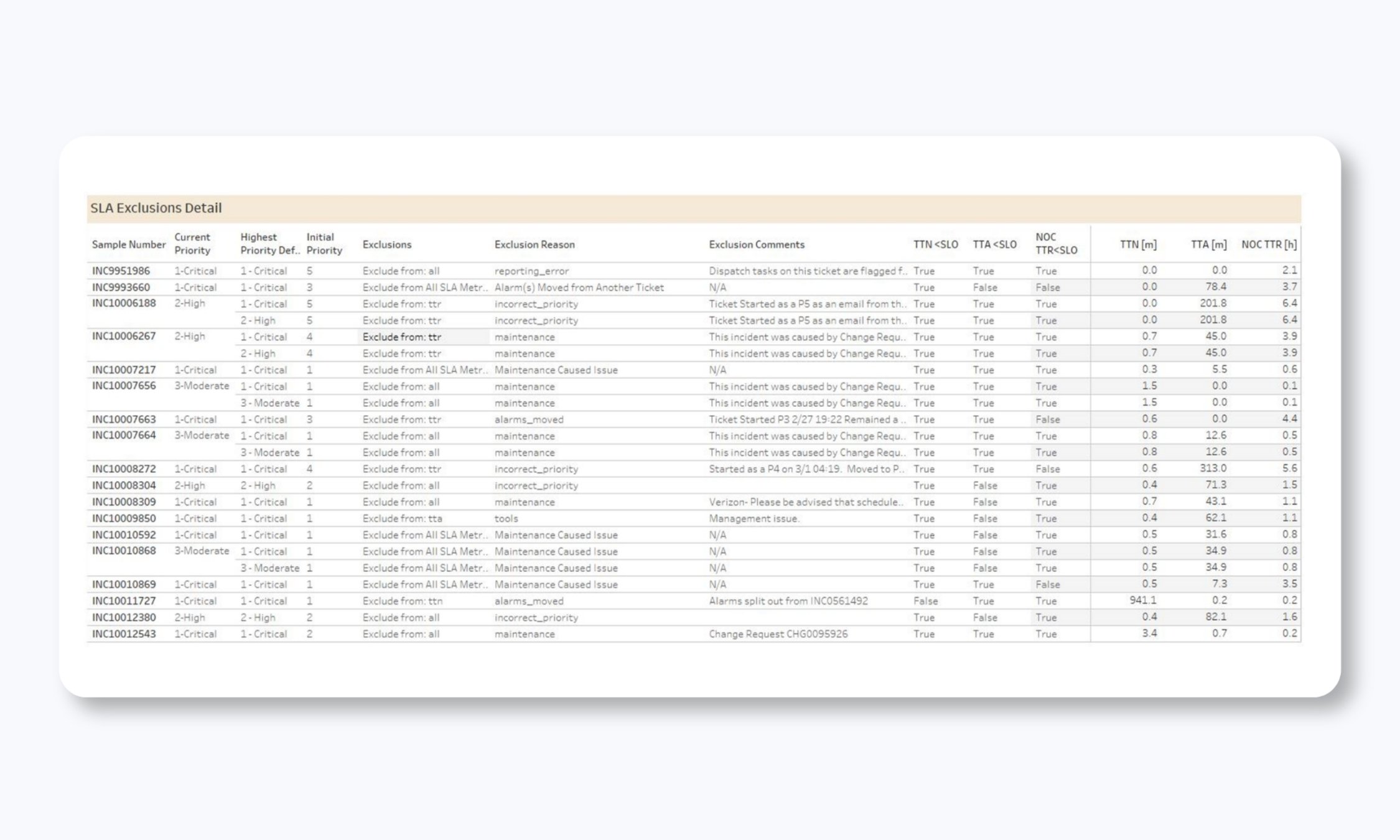
Our SLA Exclusions report documents tickets that are excluded from SLA calculations and why. Common exclusion reasons include:
- Scheduled maintenance windows
- Client-requested testing
- Known external factors (like widespread carrier outages)
- Duplicate tickets
This transparency makes sure that SLA metrics accurately reflect NOC performance rather than being skewed by circumstances outside the NOC's control.
Call Performance Reporting
For many teams, the phone is still a critical channel for incident reporting and status updates. Our call reporting provides complete visibility into phone support performance.
Call Metrics
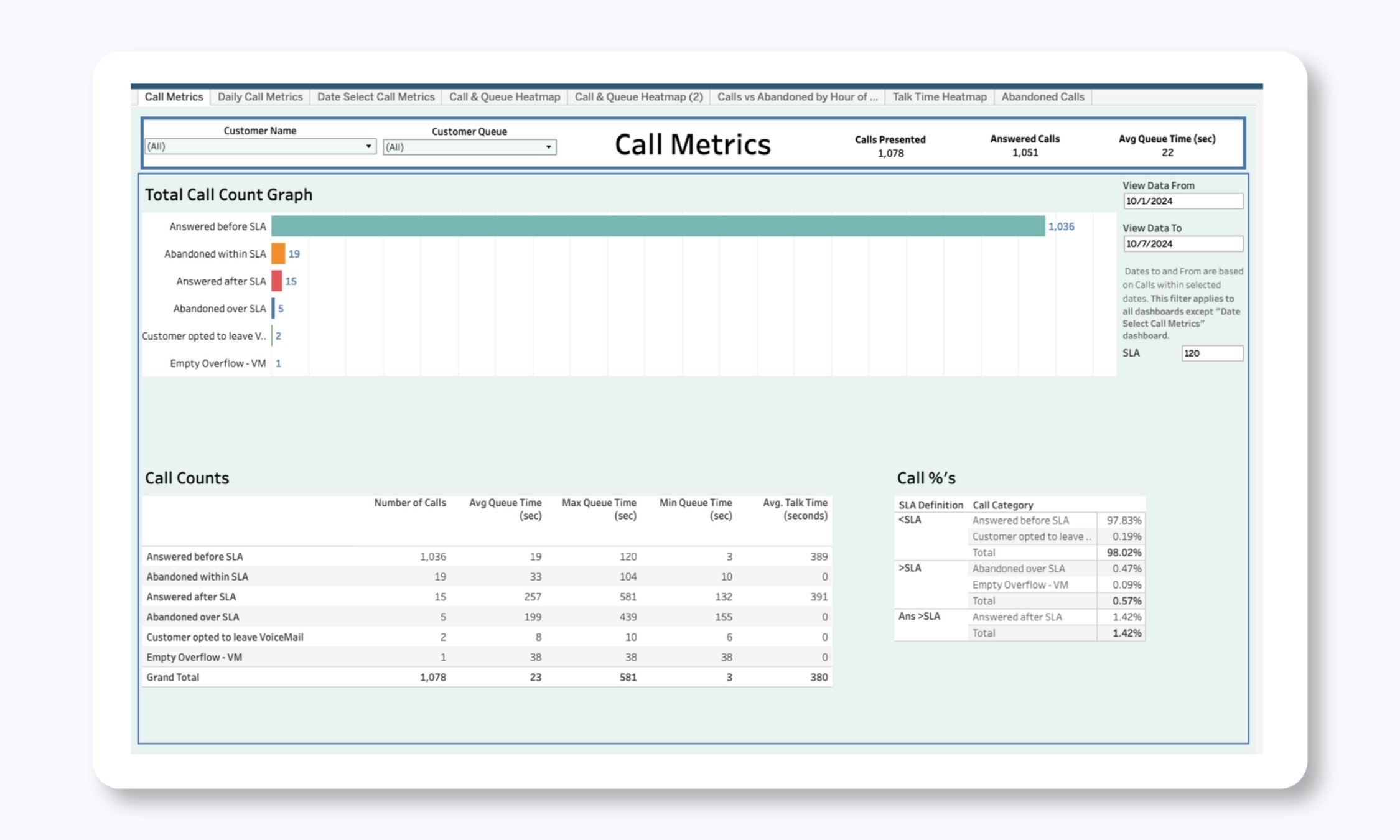
Our call reports track:
- Total calls received: All incoming calls on your dedicated lines
- Calls answered: Successful connections to NOC staff
- Abandoned calls: Calls where the caller hung up without leaving a message (tracked separately for >2 minute waits)
- Average answer time: Mean time for the NOC to pick up calls
- Maximum answer time: The longest wait any caller experienced
- Call volumes by time of day and day of week: Understanding when calls peak
Daily Call Metrics
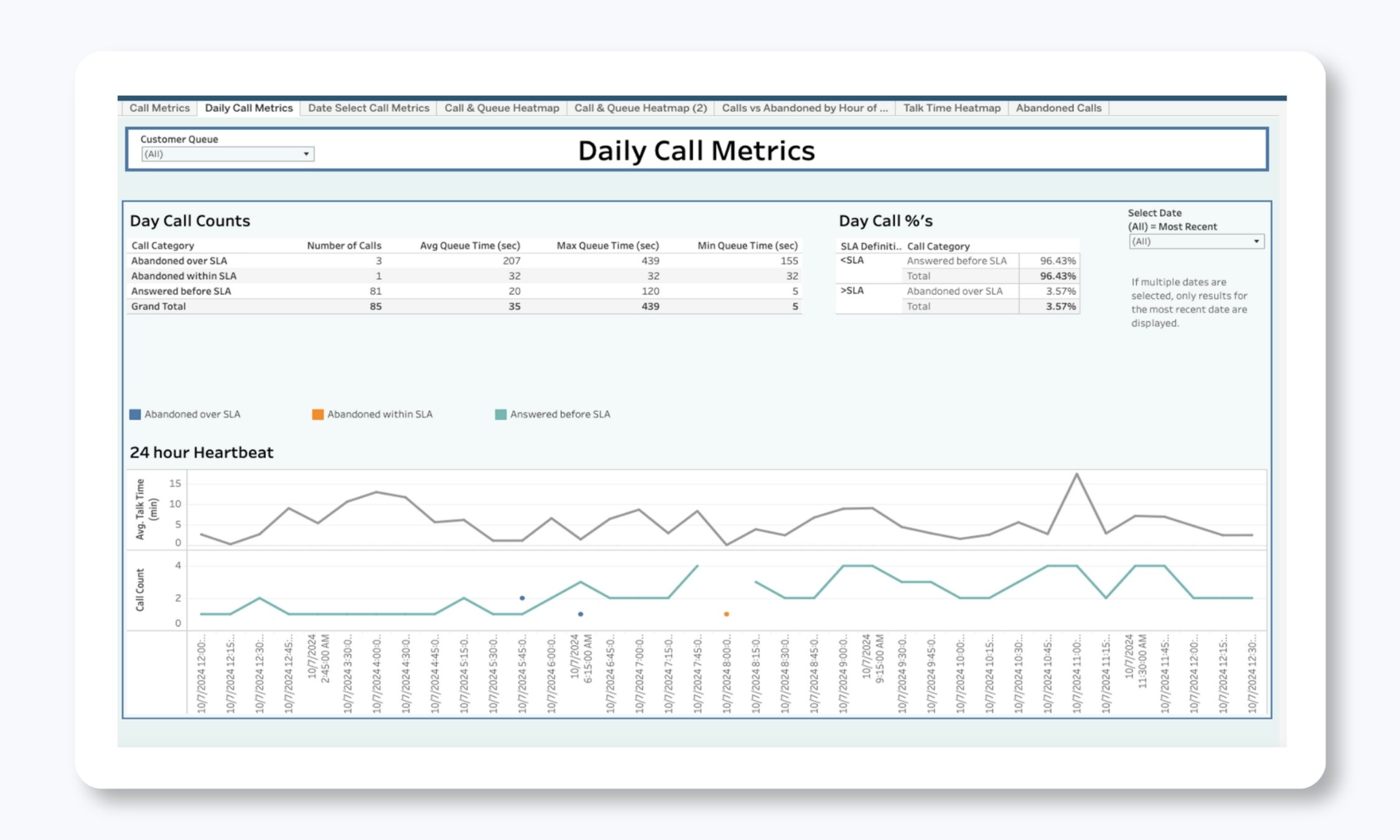
These metrics are broken down with multiple visualizations:
- Trend lines showing call volumes over time
- Day-of-week patterns showing when calls cluster
- Hour-by-hour heat maps showing peak call times
- Answer time performance against SLA targets
If you have SLA targets like "answer calls within 60 seconds on average" and "answer all calls within 10 minutes maximum," these reports show exactly how we're performing against those commitments.
Call Quality and Abandonment Tracking
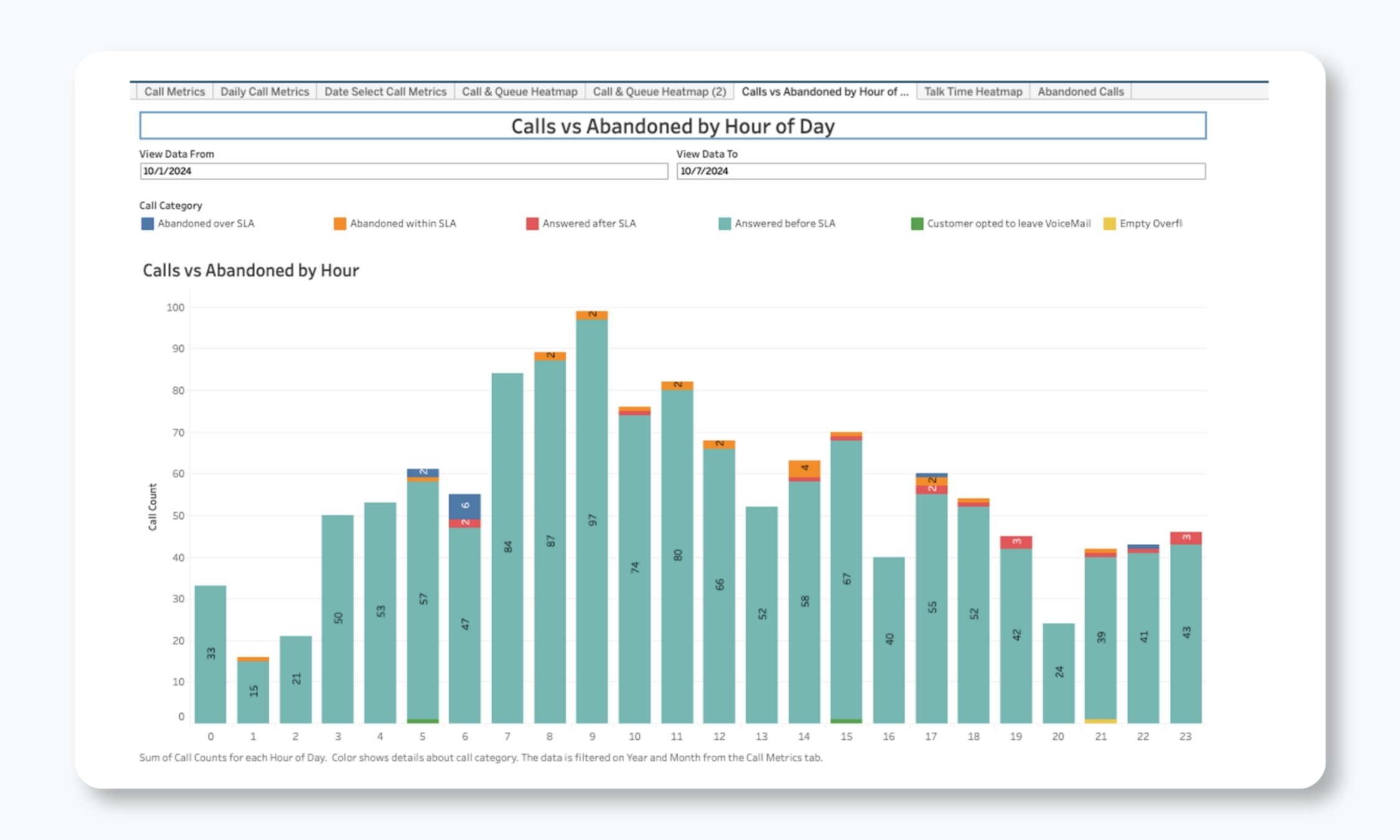
We pay special attention to abandoned calls. If someone is waiting more than 2 minutes and hangs up, that's a service failure from the caller's perspective, even if we haven't technically missed an SLA. Tracking these separately lets us identify staffing issues or call volume spikes that need attention.
Asset and Incident Insight Reporting
Understanding your infrastructure and how it behaves is critical for long-term planning and proactive maintenance.
Asset Report
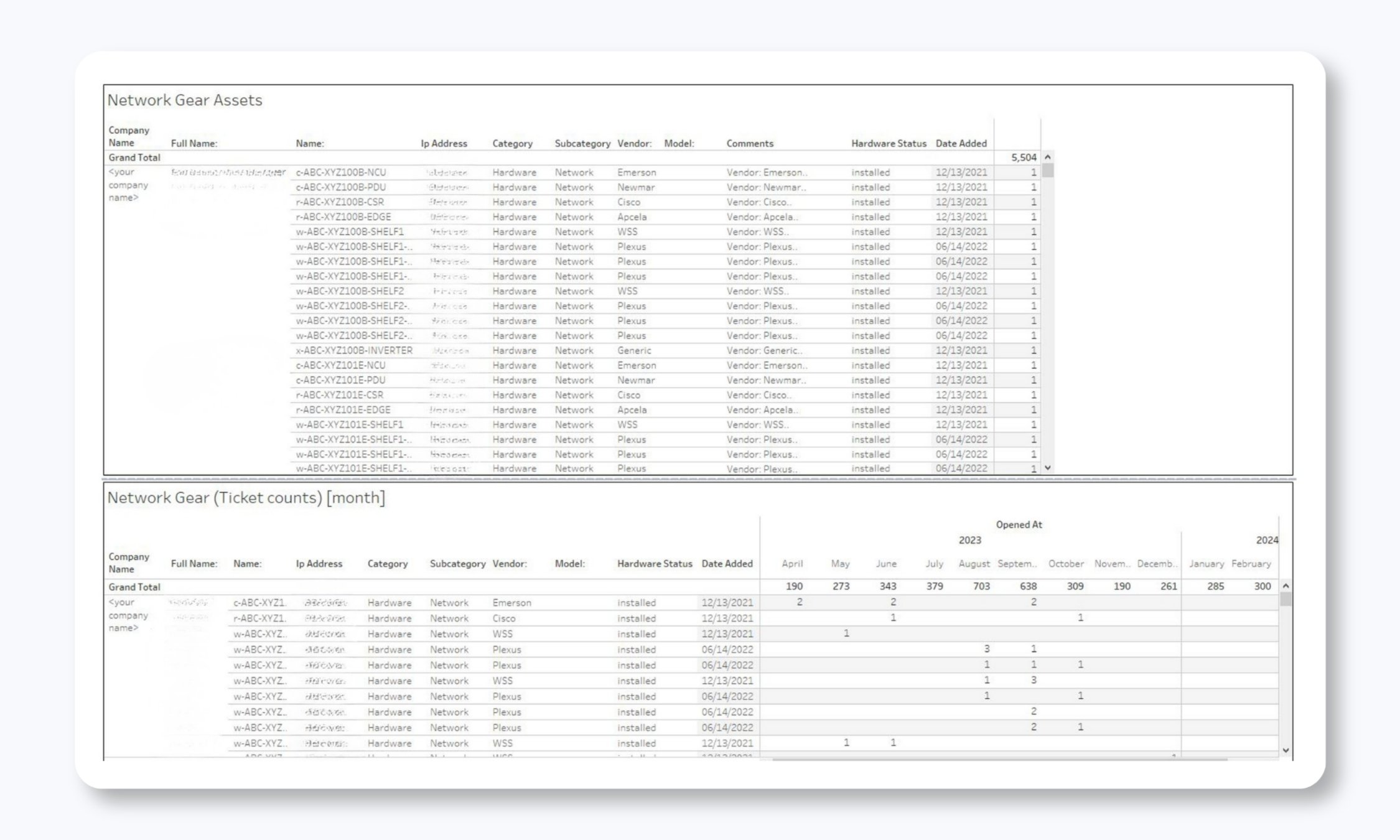
The Asset Report pulls data from our Configuration Management Database (CMDB) to show you:
- All monitored assets and devices
- Asset locations
- Device types and categories
- Incident counts associated with individual devices
- Failure trends by device or device type
This is where you identify problem children in your infrastructure. If a particular router is generating incidents every week, or if a specific switch model is consistently problematic, this report makes it obvious. You can then make informed decisions about device replacement, firmware updates, or configuration changes.
The incident count association is particularly valuable. You're not just seeing that you have 500 devices being monitored. You're actually seeing which 10 devices are responsible for 80% of your incidents. That's (finally) actionable intelligence!
Priority 3-5 Ticketed Alarms
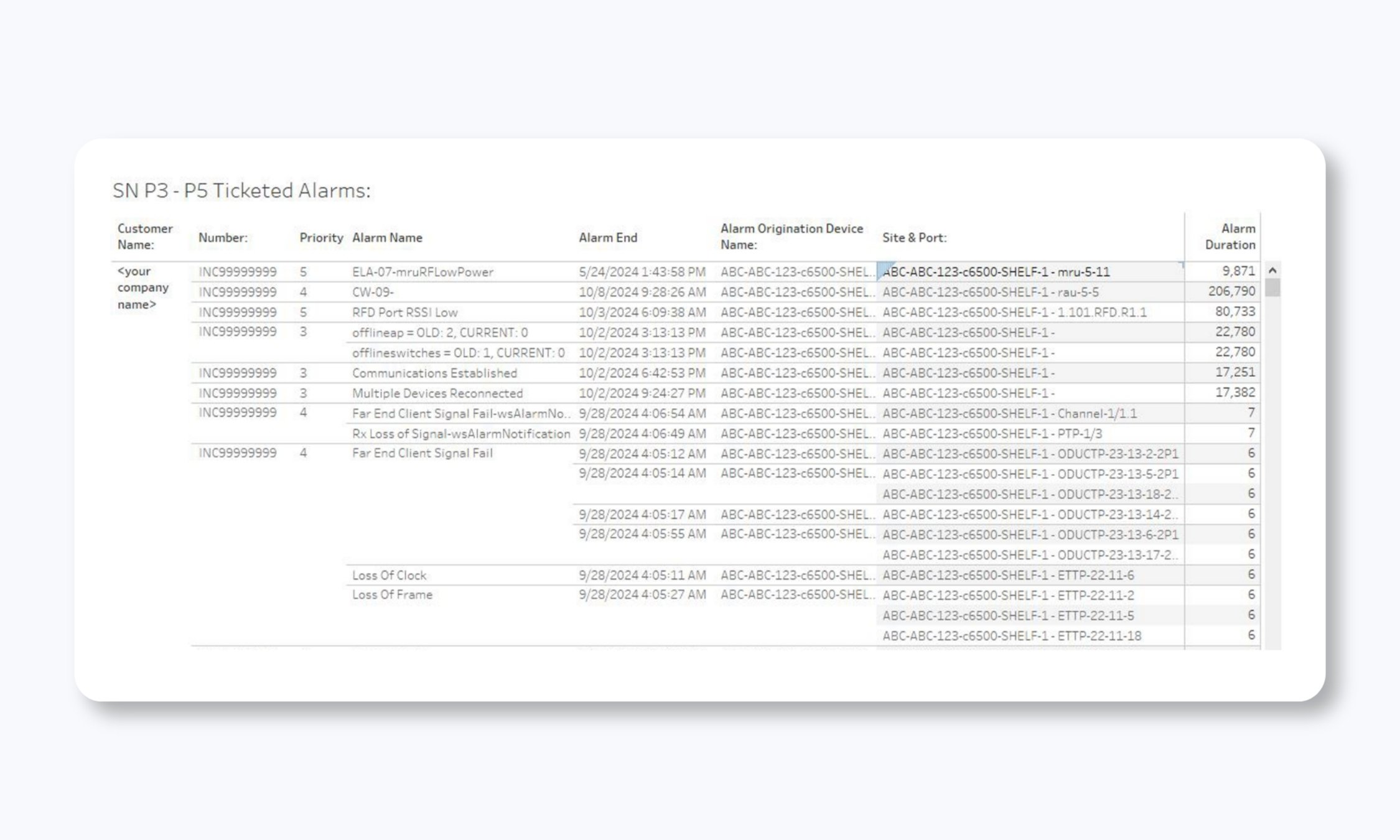
Lower-priority alarms (P3, P4, P5) often get less attention than critical incidents, but they still represent important information about your infrastructure's health.
This report shows you:
- Total P3-P5 alarms ticketed
- A breakdown by alarm type and source
- Frequency and patterns
- Resolution outcomes
Sometimes chronic P3 alarms are early warnings of bigger problems. A device that's throwing frequent low-priority alerts might be heading toward failure.
This report helps you catch those patterns before they become P1 emergencies. Again, our approach is about turning the NOC from a reactive firefighting unit into a proactive ITOps function. Metrics like these are the first step in getting there.
Optional and Custom Reporting
While our standard reports provide comprehensive coverage for most needs, we also offer optional and custom reporting for clients with specific requirements.
Let’s run through a few of them
Asset Reachability
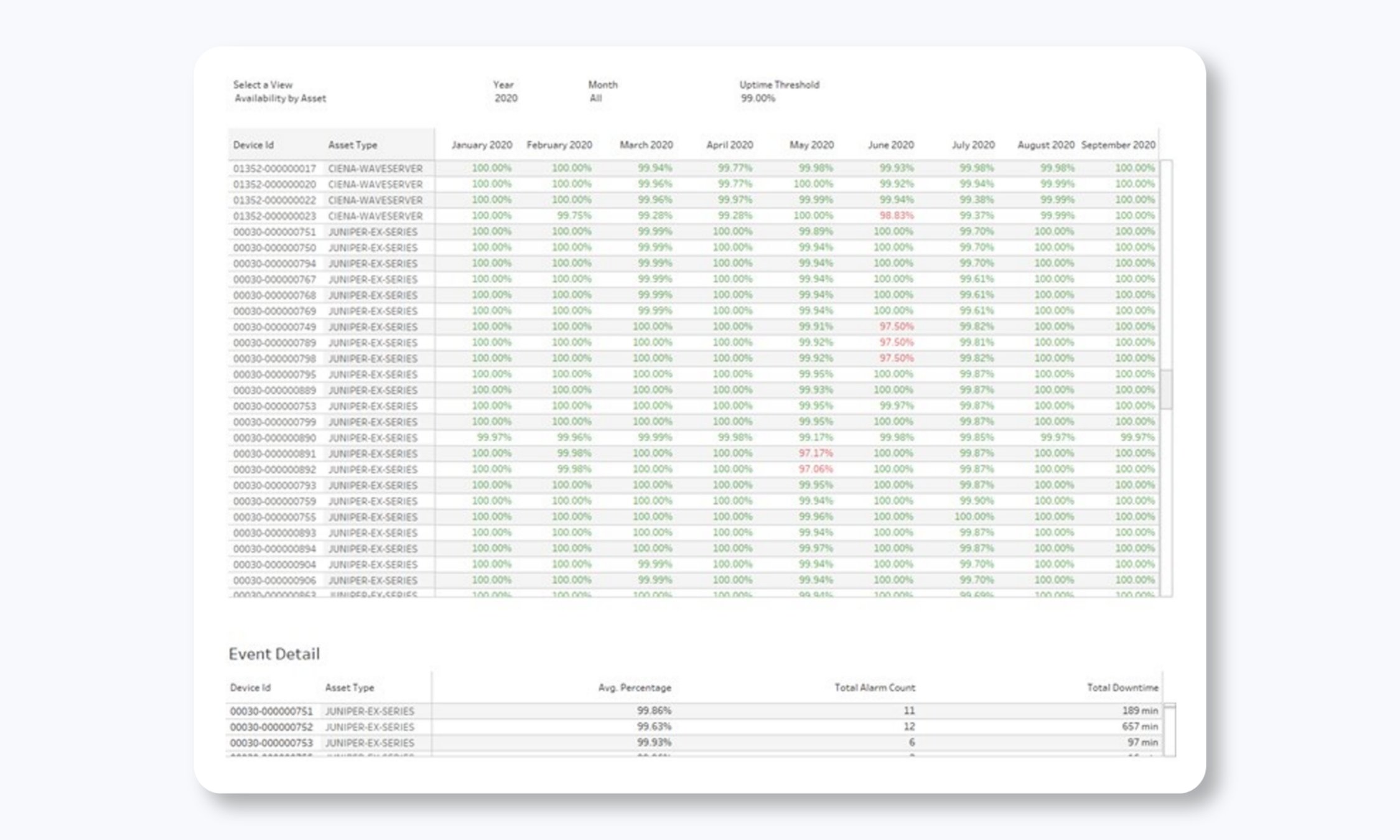
Some teams need deeper visibility into infrastructure availability beyond standard incident tracking. Our Asset Reachability Report provides:
- Asset locations mapped geographically
- Simple availability metrics based on ICMP monitoring
- Current health status of all supported infrastructure
- Historical availability trending
This gives you a bird's-eye view of your entire infrastructure's health, making it easy to spot geographic patterns or site-specific issues.
Dispatch Report
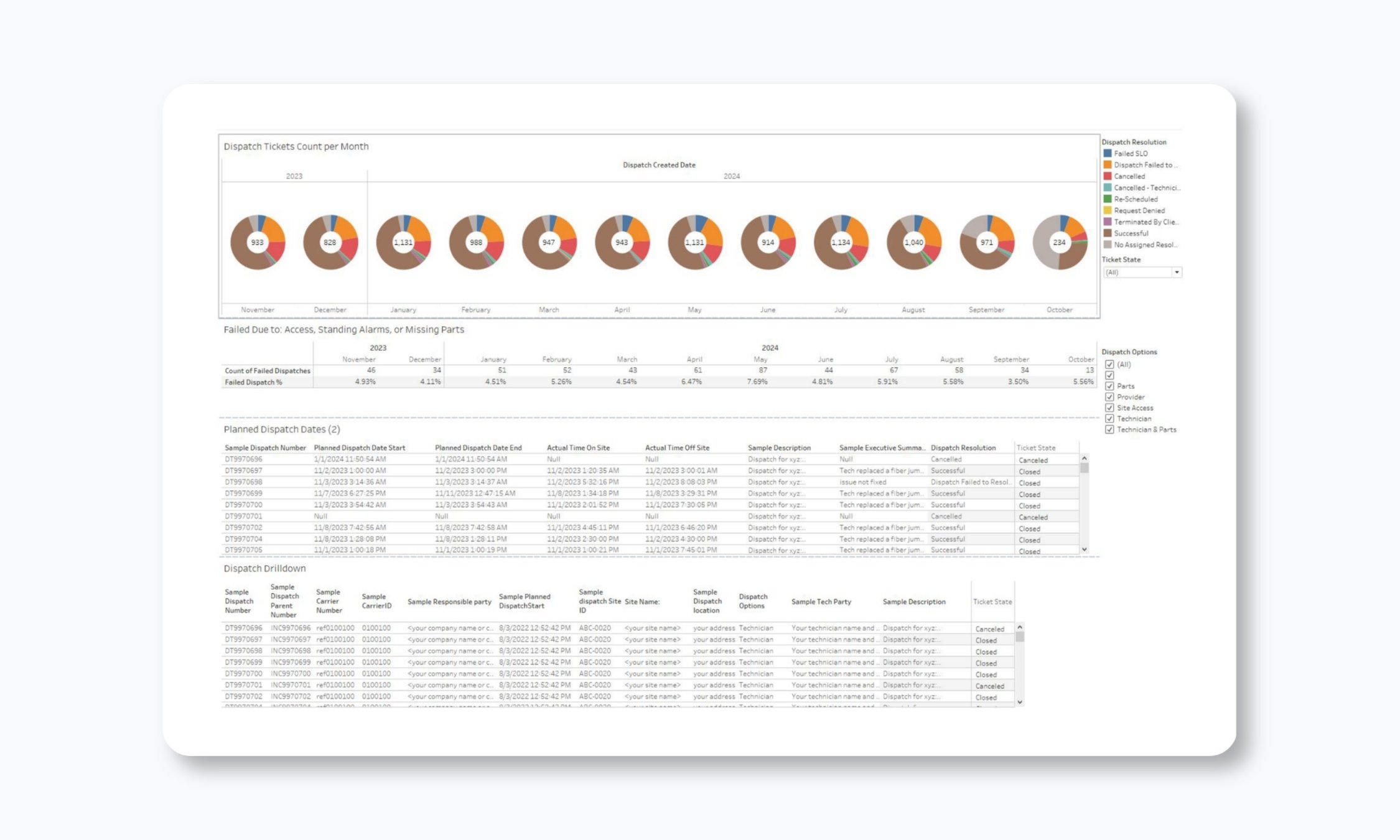
For clients who use our field dispatch services, this report shows dispatch request trends over time, the success and failure rates for dispatch attempts, planned maintenance request details and their respective windows, and super-granular per-ticket information for each dispatch.
This helps you understand how well the dispatch process is working and identify any bottlenecks or issues with vendor response.
Circuit Availability Report
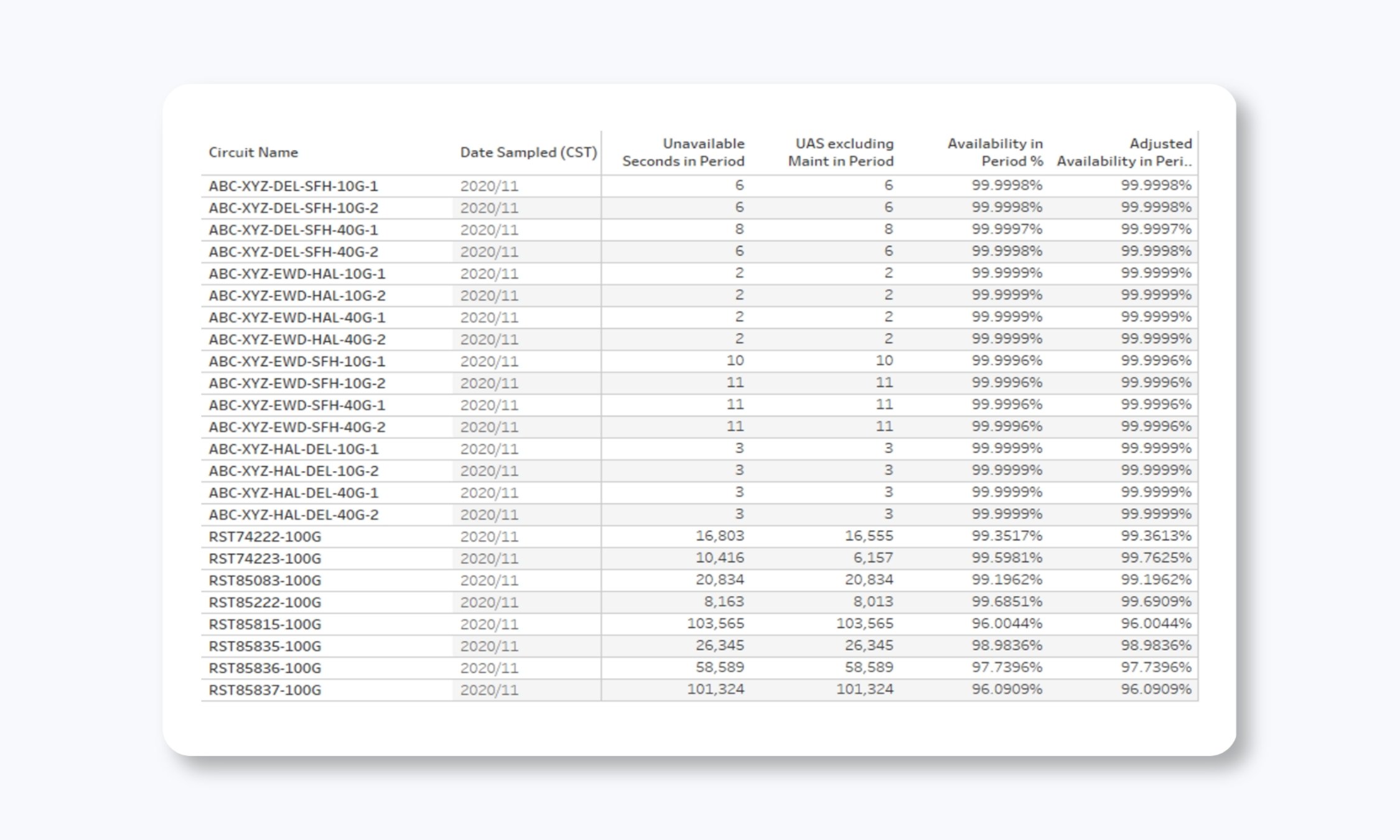
For telecom providers and other clients with specific circuit availability requirements, we can create custom reports that show:
- Availability summaries based on TL1 data or other protocol-specific information
- Unavailable seconds graphed over time
- Performance against availability SLAs (like 99.99% uptime commitments)
Task Timeline Reports
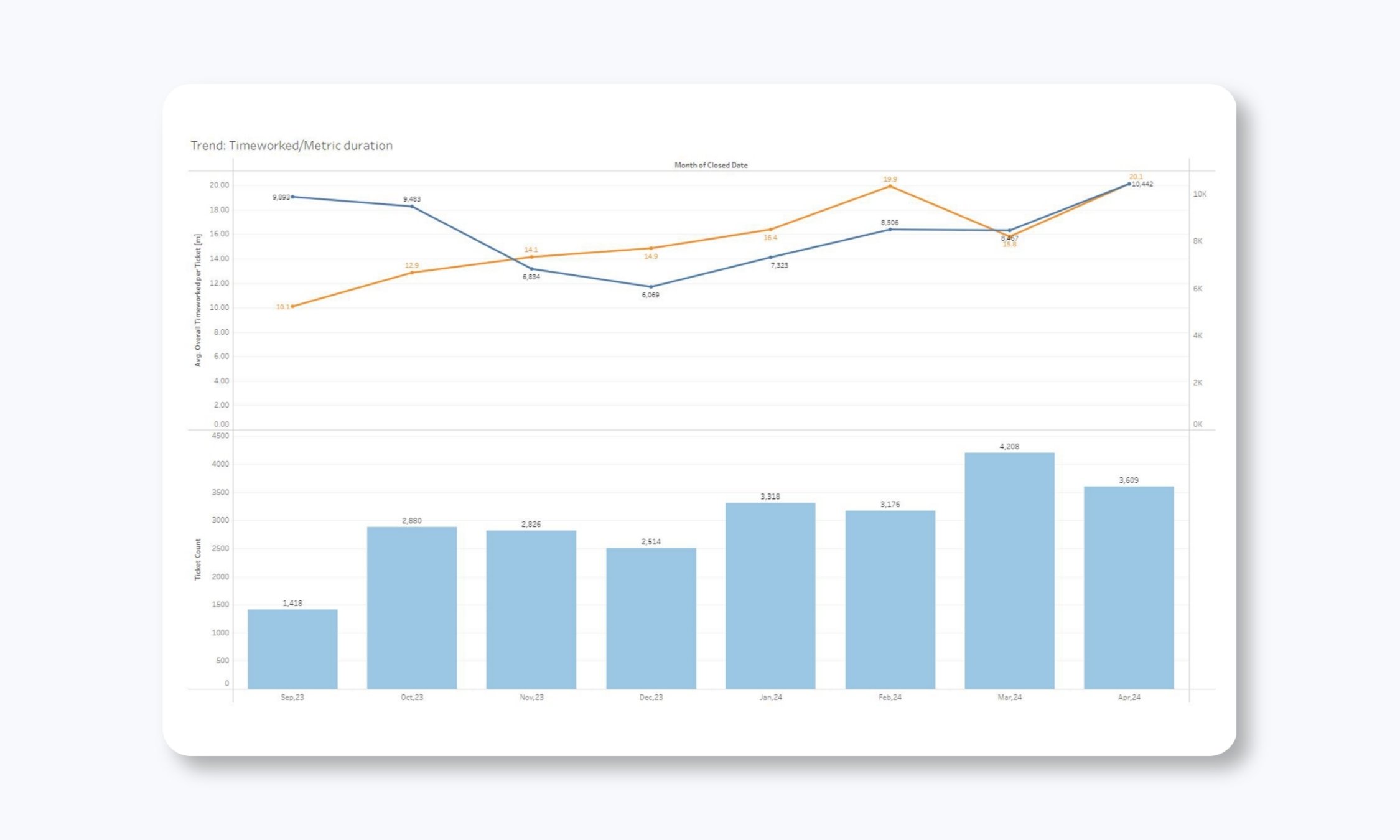
Some clients need visibility into the specific sequence of actions taken during incident resolution. Task timeline reports provide:
- A chronological breakdown of all actions taken on tickets
- Time stamps for each update and status change
- Visibility into handoffs between teams
- Documentation of all troubleshooting steps
This level of detail is particularly valuable for post-incident reviews and continuous improvement efforts.
How to Actually Use These Reports
Having all this data is only valuable if you know what to do with it. Here are some practical ways our clients typically drive this reporting into actual business processes.
Hold monthly or quarterly business reviewsOur most engaged client teams don't just log in and glance at the numbers. They schedule regular reviews (monthly or quarterly) with their team and INOC's Client Engagement Manager to:
|
Manage IT infrastructure more proactivelyMany of our reports point you to ways to improve your infrastructure. For example, many of our clients use the asset reporting to:
|
Manage vendors betterThe resolution category and Time to Restore reports can help you hold carriers and vendors accountable with data. Our clients often identify which vendors are causing the most problems and actually negotiate better SLAs based on historical performance data. |
The Difference Between Good and Great Reporting in the NOC
Having worked with hundreds of companies that switched away from other support providers, it’s clear that many NOC providers can give you basic KPI dashboards. But what separates adequate reporting from truly great reporting comes down to a few key factors.
- First, drill-down capability. Can you click on a number and see the actual tickets behind it? Or are you stuck with aggregate statistics that raise more questions than they answer?
- Granularity. Are you getting month-by-month, day-by-day, hour-by-hour views? Or just quarterly summaries that hide important patterns?
- Multiple perspectives. Are you seeing incidents broken down by priority, source, time, resolution category, and device? Or just basic counts?
- (Actually) actionable insights. Do the reports help you identify specific problems and opportunities? Or do they just confirm that the NOC is “busy?”
- Transparency. Can you see both good and bad performance clearly? Or is the reporting designed to hide problems?
We've designed our reporting to excel in all these areas. We want you to have complete visibility into what we're doing and how your infrastructure is performing. If we're falling short of a commitment, the reports will show it clearly. If there's a chronic issue in your environment, the reports will illuminate it. If a particular vendor is causing problems, you'll see the evidence.
A real-world example showing the power of trending dataWe recently migrated a large carrier client from a legacy Footprints platform to ServiceNow. This client has significant complexity—they're essentially an intermediary carrier that buys and resells fiber capacity, so their incidents often require coordination with multiple upstream carriers. Before the migration, we had good baseline data showing their incident volumes, notification times, and time-to-action metrics. After moving to ServiceNow with its enhanced correlation capabilities, we were able to compare performance:
Without detailed, comparable reporting across both platforms, we might have sensed these improvements, but we couldn't have actually quantified them. The client wouldn't know whether the migration was worth the effort, and we couldn't identify where further optimization was needed. This is the kind of value that comprehensive reporting provides. Not just visibility into current performance, but the ability to measure improvement over time and make data-driven decisions about where to invest effort. |
Ready to close the gap in your ITOps strategy? Contact us for a Discovery Workshop where we'll map your monitoring gaps, identify immediate risks, and provide a right-sized NOC plan with transparent pricing.

Free white paper A Practical Guide to Running an Effective NOC
Everything you need to know to run a modern network operations center or choose the right service partner.


-images-0.jpg?height=2000&name=ino-WP-NOCPerformanceMetrics-01%20(1)-images-0.jpg)





-images-0.jpg?width=200&height=259&name=ino-WP-NOCPerformanceMetrics-01%20(1)-images-0.jpg)