

We spend a lot of our time talking with IT leaders who are evaluating whether to outsource their network operations to a third party. Most of those conversations eventually get to the same question:
"What do we actually need to do to make this work?"
The honest answer is that a NOC transition is more straightforward than most people expect. And that’s especially true if you’re partnering with a provider that’s been refining that model over many years of operation. Our typical onboarding runs eight to twelve weeks from contract signing to go-live, and the day of cutover itself is usually a five-minute call. The reason it goes so smoothly is the prep work done in advance, on both our side and the client's.
Some of the client-side prep can start before you've even picked a provider. If you do these six things now, your eventual transition will be smoother, whether you end up working with us or not. None of these are particularly heavy lifts. They're just the kind of homework that pays off later.
1. Pull Together What Documentation You Have
The single biggest factor in how smoothly an onboarding goes is the quality of the client's existing documentation. And by "quality," I don't mean polished. I mean existing and somewhat accessible.
Of course, the lack of documentation is very (very) often a symptom of the problems that lead companies to outsource their monitoring and management functions in the first place, so it’s normal not to have everything here.
That said, here’s what helps if you have it:
- Network diagrams. Even a rough Visio file or a hand-drawn whiteboard photo is better than nothing. We just need to understand how your environment connects.
- Asset lists. What devices do you have, where are they, and what are they doing? A spreadsheet works fine.
- Any runbooks or procedures you've written down. Even informal notes about "when this happens, we do that" are useful.
- Vendor and circuit information. Carrier names, circuit IDs, support contacts, contract numbers.
- Recent incident history. If you have ticket data or even just a memory of "the things that broke last year," that context helps us understand your environment quickly.
We'll take anything we can get our hands on, even if it's not pretty! If your documentation is messy or out of date, that's fine. It's still better than starting from zero. And if you've been meaning to update it, now is a good time because compiling it for an outsourced NOC tends to surface gaps you didn't know you had.
2. Identify Who From Your Team Will Help with Onboarding
This sounds obvious, but it’s often not as well handled as it should be.
The most common mistake we see is when the people who sign the contract aren't the ones who'll be doing the day-to-day work with us during onboarding, and there’s no formal internal handoff to clarify roles. The CIO or a similar leader signs the deal, hands it off to the network manager, who passes it to a senior engineer already overcommitted and now with another project on their plate.
Before you start onboarding, identify the people who will:
- Walk us through your environment
- Answer questions about how your network is configured and why
- Fill out the onboarding paperwork (more on that in a minute)
- Validate runbook procedures
- Be available for weekly project calls
For network support work, that's usually someone from your network team. For help/service desk work, someone from your support team. For both, you need a primary point of contact who can speak for the IT organization and pull in others when needed.
The clients whose onboarding goes fastest are those in which the right people are identified in week one and stay engaged through go-live. The ones that tend to drag are the ones where the project bounces between people who don't have the full context.
3. Get Your Security Team in the Loop Early
This is the prep step that gets overlooked most often, and it's the one that causes the most friction when it gets skipped.
We'll need access to your environment to complete the work. That typically means a VPN tunnel between your network and ours, credentials to log into the equipment we're managing, and in some cases, a network discovery scan to map your infrastructure.
None of that is unusual or risky, but if your security team hears about it for the first time the week before go-live, you're going to have problems. We've had situations where a client didn't tell their security team we were going to scan the network, and the security team's monitoring tools (correctly) lit up like a Christmas tree. That's a difficult phone call, so we try to motivate teams to avoid it!
A few things to discuss with your security team now, even if you haven't picked a provider:
- Are you willing to set up a VPN tunnel to a third-party NOC?
- What's your policy on shared credentials versus individual credentials for vendor access? (Individual credentials are fine, but if you're managing 80 devices and the NMS requires per-user licenses, that's a cost conversation.)
- Will you allow a third party to perform a network discovery scan, with advance notification?
- Are there any compliance frameworks (HIPAA, PCI, CMMC, NIST) that change what we can or can't do?
Having those conversations in advance means your security team is informed and the practical access questions get resolved early instead of becoming a blocker during service go-live.
4. Block Some Time on Your Team's Calendar
Onboarding a NOC service is always collaborative. We can't do it without you, and you can't fully delegate it to us. There are specific points in the process where we need information that only your team has.
The three core documents we ask clients to complete during onboarding are:
- The Configuration Management Database (CMDB). Configuration data for every device, circuit, and service in scope.
- The runbook questionnaire. How you want us to handle specific scenarios when they happen.
- The onboarding worksheet. Contact information, escalation paths, notification preferences, and the practical details of how we'll work together.
These are typically worked through over a few weeks, in pieces, with weekly check-in calls. The clients who breeze through this part are the ones who reserved calendar time for it in advance. The ones who struggle are the ones who tried to fit it in between everything else they were already doing.
We usually tell teams onboarding new service with us to plan for about two to four hours per week of dedicated time from your primary contact during the active onboarding period (roughly six to eight weeks of active work inside the longer window). Plus availability for a weekly project call. That's not a huge ask, but it has to be real-time, not "if-I-have-a-minute" time.
If your team is already at capacity, that's a conversation to have with leadership before you start, not a problem to discover in week four!
5. Define What "Critical" Means in Your IT Environment
When something breaks, what's actually a “Priority 1” versus a P2 or P3?
This is one of the most important conversations we have during onboarding, because the priority structure drives everything downstream: how fast we respond, who we contact, which alarms trigger which notifications, and what gets escalated immediately versus what goes into a normal queue.
Before you talk to a NOC provider, have an internal conversation about what your business considers critical. Some practical questions to work through:
- Which systems, if they go down, stop your business from operating?
- Which systems can tolerate an outage of an hour without serious impact? A day? An hour?
- Are there time-of-day or time-of-week factors? (A retail business cares about Saturday traffic differently than a B2B SaaS company.)
- Who needs to know about a P1 immediately? What about at 3am? On a holiday?
You don't need to have a formal severity matrix worked out. But you should have a rough sense of what matters most, because that conversation will happen during onboarding, and it goes faster when you've thought about it.
6. Map Your Internal Escalation Paths
Who does what inside your organization around incident management?
When a P1 hits and we need a decision about whether to reboot a production server, who can we call? When a security incident surfaces and your CISO needs to be looped in, what's the right path? When a vendor RMA arrives at a remote site, who's there to install it?
We've worked with clients (usually larger organizations) where it took us quite a while to figure out who actually owned a particular system or process internally. The client side wasn't being uncooperative — they genuinely didn't know which department handled what!
That's a problem worth solving regardless of whether you outsource your NOC. But if you're heading into a NOC transition, having a clear map of:
- Who owns each system in scope
- Who has the authority to approve changes
- Who needs to be notified for which kinds of incidents
- Who handles vendor coordination
- Who manages physical/on-site access
...makes everything that follows much easier. The clients who have this mapped out can answer our questions in minutes. The ones who don't end up running around internally trying to find the right person, which is its own kind of drag on the process.

A Look at Our Actual NOC Onboarding Process
If you do these six things in advance, your onboarding looks something like this: we sign a contract, assign a project manager, and run an internal kickoff.
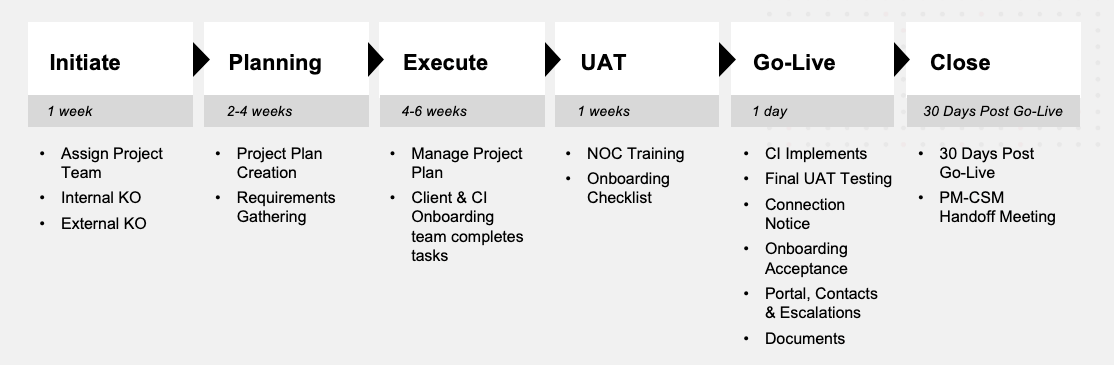
Within a week or two, we run an external kickoff with your team. Over the next six to eight weeks, we work together through the three documents, build out your CMDB in ServiceNow, finalize runbooks, configure monitoring, and integrate with your existing tools.
About a week before go-live, we run UAT and internal NOC testing (over 100 individual checks to make sure everything's wired correctly). The day of go-live itself is usually a five-minute call to confirm we're ready, and then we flip the switch. After that, the project manager stays with you for 30 days to handle anything that surfaces, and then your account transitions to a Customer Success Manager who stays with you long-term.
That's it! It's not particularly arduous. The work is real, but it's well-defined, and we've done it enough times to know exactly where the friction points are. The prep above just removes those friction points before they show up.
If you're at the "still figuring out what we want" stage, the six items in this post will serve you well no matter which provider you eventually pick. If you're at the "ready to talk to providers" stage, we'd be happy to walk you through how we'd approach your specific environment. Either way, get the prep started. It's the highest-leverage time investment you can make right now.
Talk to us to learn more about the process and our support service.
Free white paper A Practical Guide to Running an Effective NOC
Download our free white paper and learn how to build, optimize, and manage your NOC to maximize performance and uptime.

-images-0.jpg?height=2000&name=ino-WP-NOCPerformanceMetrics-01%20(1)-images-0.jpg)



-images-0.jpg?width=200&height=259&name=ino-WP-NOCPerformanceMetrics-01%20(1)-images-0.jpg)