
Help Desk Maturity in 2026: From Reactive Break-Fix to Intelligent Service Delivery

Peter Prosen

By Peter Prosen

Vice President of NOC Operations, INOCPete has 30 years’ experience in engineering and sales, including systems engineering, software development, OEM and channel sales, product management, process design and improvement, and system quality assurance. He has worked for a range of companies in the cable, telephony, cellular data and wireless markets, including E-Band Communications, Motorola, FlexLight Networks and ADC Telecommunications. The high-level wireless expertise Pete brought to INOC enabled the development of new and innovative solutions for clients. As manager of both INOC’s NOC and field services teams, he ensures quality and efficiency across the operation.

If you work in IT support or rely on it, you've probably noticed that the term "help desk" doesn't quite capture what modern service delivery needs to look like anymore.

The traditional model of taking a call, fixing a problem, and closing a ticket served its purpose for a long time, and still does of course. But the reality in 2026 is that teams need something smarter, faster, and more connected.

At Xerox IT Solutions, we're in the middle of evolving how our service desk operates. And to be upfront: we're not standing on a mountaintop saying we've arrived. We're deep in the work. Most of what I'm about to walk through is being built right now, and some of it is where we know we need to get to.

That honesty is more useful to you than a polished marketing pitch, because the truth is that help desk maturity is a journey, and most organizations are somewhere in the early chapters.

Why We Stopped Calling it a "Help Desk"

We’re working toward retiring the "help desk" label internally, moving to Enterprise Service Desk instead. And that's not just a rebrand for the sake of it. The distinction matters functionally.

Let’s break it down quickly:

Help Desk

A traditional help desk handles end-user issues:

  • “My laptop won't turn on.”

  • “I can't log in.”

  • “My email is acting up.”

That's legitimate Tier 1 work that won’t be going away. But what actually comes through the phone lines and support portal is a much wider range of issues now. An end user might call in and say "nobody in our office can use this application" — that's not a laptop problem. That's a potential application incident or a network issue that needs to go to a completely different team.

When you call it a "help desk," everyone starts to think that every inbound call is the same kind of thing. It's not. We've had clients using "help desk" support where the actual work we do is managing their WiFi infrastructure and taking calls from store managers about fire alarm systems. That's not end-user support in any traditional sense.

Enterprise Service Desk

The Enterprise Service Desk framing recognizes that the front door is one door, but what happens behind it needs to be intelligent.

The end user shouldn't have to know whether their problem is a service desk issue, a NOC issue, or a server operations issue. They call in, and we figure out what they need (or increasingly, the system figures it out) and route it to the right team.

The Tower Model for Smarter Routing

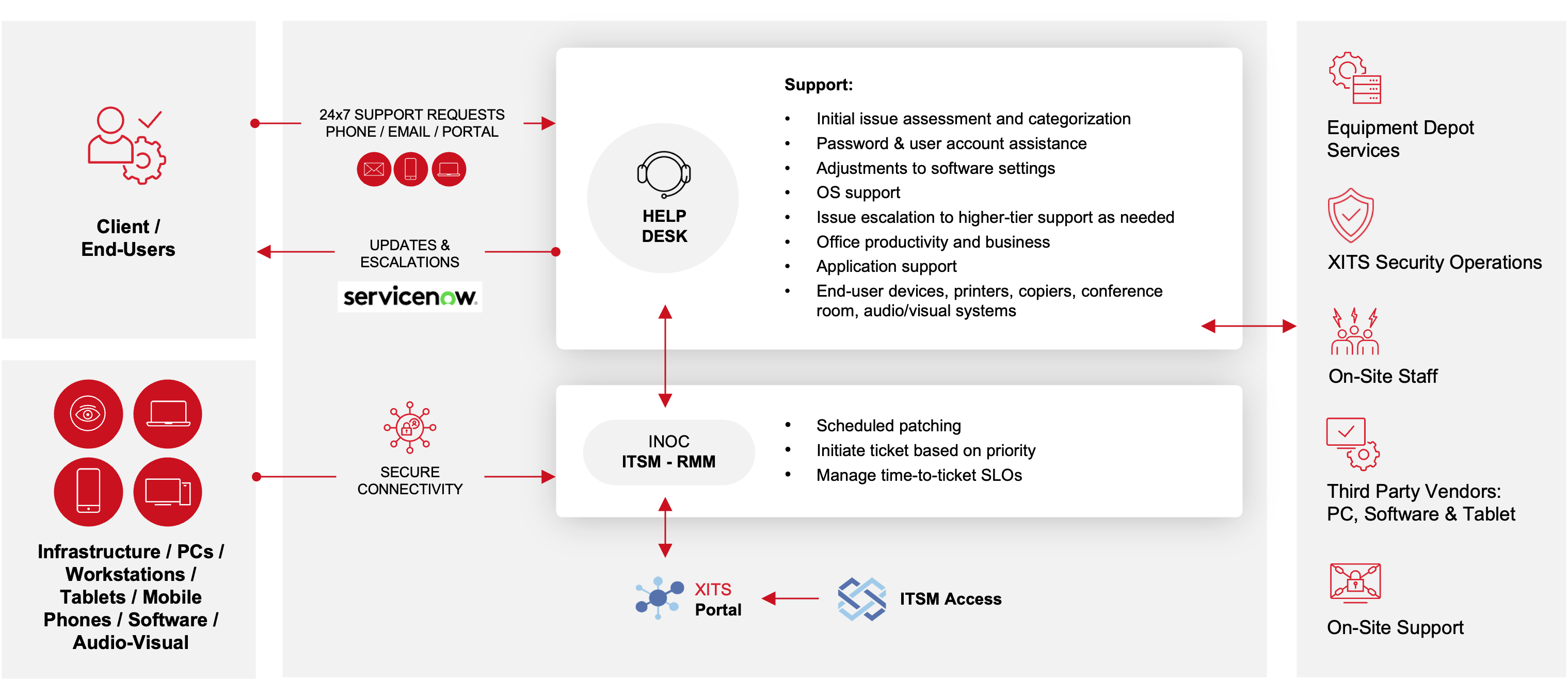
We're moving toward what we call a tower model for service delivery. Here's the basic idea:

Everything that comes in through a person (a phone call, an email, a portal submission) goes to the Enterprise Service Desk. That's the human-initiated channel.

From there, our team (and eventually AI-assisted triage) determines whether this is a true end-user support issue, something that needs to be escalated to end-user compute for deeper remote desktop troubleshooting, or something that needs to go to a specialized team entirely.

Everything that comes in through an alert (alarms, monitoring, proactive tickets) goes to the NOC. The NOC handles triage on system and network issues, runs through runbook procedures, and engages the appropriate support tier. (If you’re not familiar with the Ops 3.0 platform that powers our NOC operation, you can learn more about that in our explainer.)

Within this model, we have specialized towers:

  • Enterprise Service Desk — The front line for all human-initiated contacts. Password resets, basic troubleshooting, initial issue assessment and categorization, software adjustments, and OS support.

  • End User Compute — Remote desktop support for issues that go past the 15-minute quick-fix threshold. If a laptop problem can't be resolved at the service desk level, it moves here, where a technician can log in remotely and work on the device directly, always with the user present on the line.

  • DCO (Data, Cloud, and Operations) — Server-side issues. If someone's problem traces back to a server or cloud infrastructure issue, it goes here rather than sitting in the end-user queue.

  • NOC — Network infrastructure, access points, switches, firewalls. All alerting-based, proactive work lives here.

We're also working to set up a dedicated channel for sysadmins, specifically. Right now, if a client's system administrator has already done extensive troubleshooting and needs higher-level support, they still have to come through the same service desk front door as an end user with a password problem. That's frustrating for everyone!

We're exploring options like a dedicated phone line or routing path that lets experienced sysadmins bypass Tier 1 triage and go directly to end-user compute or DCO.

Here’s a high-level look at how these different support components generally fit together into a cohesive, mature operating system:
ClientInterface

Addressing the Data Integrity Problem

Here's something that doesn't make it into most vendor marketing materials: before you can actually use AI in a space like this, before you can do meaningful trend analysis, before you can identify your "low-hanging fruit" for automation — your ticket data has to be clean. And in most organizations, it isn't.

We’ve seen this play out firsthand when tickets aren’t categorized correctly. Someone may not document what they actually did to resolve the issue or track their time accurately.

Here’s a concrete example:

A company whose IT infrastructure we monitor and manage has no servers. But when agents reset a client's password, they log in to the Active Directory server to perform the reset, so they categorize the ticket as a "server" issue.

It should be categorized as a security/password reset. That misclassification pollutes your metrics. When we try to answer the question "What are the biggest hitters that we should automate first?", the data doesn't give us a trustworthy answer.

Time tracking is another component here. If agents are logging the same time period on everything and then having eight separate entries in the same, say 15-minute window, it would add up to two hours of their day.

The math doesn't work. You simply can't do meaningful capacity planning or identify your most time-consuming ticket types when the data is that unreliable.

This is one of the things we're most looking forward to solving in our new platform. In Ops 3.0 (the INOC platform we built for our NOC workflow), we solved this with a simple mechanism: you click "work ticket," you work the ticket, you hit save, and the system calculates your time. No manual entry. No opportunity for human error. That same approach is coming into the Enterprise Service Desk tooling.

And this is where AI can start to help even before the flashy stuff. We’re hoping we can get to a point where AI reviews tickets in real time or after the fact and says: "You categorized this as a server issue, but based on what's in the notes, this looks like a password reset. I'd recommend recategorizing it." That kind of quiet, behind-the-scenes intelligence improves the entire foundation that everything else is built on.

INOC Article Space BreakWhere AI Fits and Where It Doesn't Yet

It’s important to be honest about where we are with AI in the service desk: it's early. These things take time to implement, and we have many parallel workstreams competing for that time.

That said, the vision is clear, and it's grounded in real operational needs:

Within this model, we have specialized towers:

  • For our agents: We’re working on implementing Now Assist to build a database of common issues and recommended solutions. When a ticket comes in — say, via email — the system would read it, match it against known solutions, and recommend a resolution path to the human agent. Instead of having people manually scour documentation and knowledge bases, the answer is surfaced to them. That's a time-to-resolution improvement that doesn't require the AI to interact with the end user at all.
  • For end users (voice): We're exploring integrations between our phone system and ServiceNow so that when a user calls in, an AI-powered voice system can walk them through basic troubleshooting. Did you try this? Okay, let's try that. If it solves the problem, it creates a ticket, documents what happened, and closes it — no human agent needed. If it can't resolve it, it takes the full transcript of the conversation and hands it off to an agent with all the context already captured.
  • For end users (portal): We want to get more users opening tickets through a self-service portal with structured templates. When you fill out a template, you’re prompted to provide the information we need, which eliminates much of the back-and-forth that eats up agent time. But to be realistic, a lot of teams need a partner like us precisely because their people aren't technical. Asking a non-technical end user to navigate a web portal and fill out a ticket template might be expecting too much in some cases. That's where the voice-based AI becomes a more natural path for many users.

Breaking the Break-Fix Cycle

Here's where we get genuinely excited about where this is heading. We actually think the help desk *or the service desk, or whatever you want to call it) is more ripe for AI-driven problem management than the NOC was.

In the NOC, there's a common workflow, but each ticket has a lot of inherent individuality. A port goes down, you check the circuit, you call the carrier — but it's not the same carrier every time, not the same phone number, not the same root cause. The workflow is consistent, but the variables change a lot.

In end-user support, you often have much higher concentrations of truly repetitive issues:

  • Password resets.
  • VPN connection problems.
  • The same application is crashing on the same laptop model.

If you have clean data (see above) and a smart and reliable AI that can analyze your ticket history, it should be able to come back and tell you:

"Out of the last 1,500 tickets, a thousand of them were this same problem. Here are the steps your agents actually used to resolve. Here's a draft knowledge article. And here's my recommendation for what to automate next."

That's the vision: AI that doesn't just answer tickets, but also reads across your entire ticket history to identify patterns, generates knowledge articles from what your best agents actually do, and tells you where to focus your automation efforts. This is what turns a help desk from a reactive cost center into a system that actively improves its efficiency over time.

But — and this is the part that completes the circle — it only works if human agents accurately document what they did. A lot of typical help desk ticket documentation has only needed to be "yep, all done" with no detail on the resolution. If the AI has nothing to read, it has nothing to learn from. So the foundational work of improving ticket quality isn't just an operational hygiene issue. It's the prerequisite for everything else.

INOC Layers

What's Coming Next

I'd be remiss if I didn't mention the next-generation platform that's currently in development. It’ll be designed to bring together ServiceNow's latest tools with our current Ops 3.0 platform capabilities. Managed workstation support is the first service line we're targeting for implementation.

While we’re still a little ways away from being able to clearly articulate what this will look like on day one and how it evolves from there, what I can tell you is the intent: get the base platform right, then build on it. Add AI capabilities. Add the telephony integration (CTI — computer-telephony integration) so that when someone calls in, the system knows their existing cases and can say, "I see you have an open ticket from yesterday. Here's the latest update. Do you want more information, or is this about something new?"

That link has just been built. Now we need to implement it in our environment and figure out how it works operationally.

The end goal is a platform that handles managed workstation support, service desk operations, and eventually broader managed services in a way that's genuinely intelligent, not just automated, but adaptive. The pieces are starting to come together.

Where This Leaves You

If you're evaluating your own help desk maturity (or looking at providers) here's what I'd encourage you to think about:

Within this model, we have specialized towers:

  • Start with your data. Before you get excited about AI and automation, review your ticket categorization, time tracking, and resolution documentation. If that foundation is unreliable, nothing you build on top of it will work the way you expect.

  • Think about routing, not just resolution. The biggest time sink in many help desks isn't the fix itself; it's getting the issue to the right person in the first place. A tower model with intelligent triage (human or AI-assisted) can dramatically reduce the time between "I have a problem" and "I'm talking to someone who can actually help."

  • Be honest about your users. Not every end user is going to use a self-service portal. Not every end user wants to talk to an AI. The best service delivery models give people multiple paths and meet them where they are.

  • Don't separate the help desk from everything else. The days of the help desk as an isolated island are ending, at least with us. When your service desk is connected to your NOC, your monitoring platform, your CMDB, and your managed services operations, you can do things like spot recurring end-user issues that trace back to infrastructure problems — and fix the root cause instead of just resetting the password for the fifteenth time.


We're building toward all of this at Xerox IT Solutions. It's a work in progress, but the direction is clear, and the foundation is being laid right now. Have questions about service desk maturity or our current capabilities? Contact our team to continue the conversation.

Practical NOC Guide cover

Free white paper A Practical Guide to Running an Effective NOC

Download our free white paper and learn how to build, optimize, and manage your NOC to maximize performance and uptime.

Peter Prosen

Author Bio

Peter Prosen

Vice President of NOC Operations, INOCPete has 30 years’ experience in engineering and sales, including systems engineering, software development, OEM and channel sales, product management, process design and improvement, and system quality assurance. He has worked for a range of companies in the cable, telephony, cellular data and wireless markets, including E-Band Communications, Motorola, FlexLight Networks and ADC Telecommunications. The high-level wireless expertise Pete brought to INOC enabled the development of new and innovative solutions for clients. As manager of both INOC’s NOC and field services teams, he ensures quality and efficiency across the operation.

Grab our other NOC resources

What’s your NOC solution?

24x7 NOC Support Services

Our network operation centers and 24x7 service desk monitor tens of thousands of infrastructure elements around the clock and provide Tier 1-3 support around the clock.

NOC Operations Consulting

Our network operation centers and 24x7 service desk monitor tens of thousands of infrastructure elements around the clock and provide Tier 1-3 support around the clock.

White paperThe NOC Improvement Playbook: 10 Common Problems We See and Solve in Our Consulting Engagements

ino-TheNOCImprovementPlaybook-02-images-0

This playbook identifies the most common challenges we encounter in NOC operations and provides field-tested solutions drawn from our real-world consulting experience.

  • Identify and address critical operational gaps in your NOC.
  • Implement practical solutions that deliver immediate and long-term results.
  • Access a comprehensive self-assessment framework.

Submit the form below and we’ll deliver the guide right to your inbox.

White paperTop 11 Challenges to Running a Successful NOC — and How to Overcome Them

ino-Top11Challenges-Cover-01

Most network operations centers fail to meet the service levels demanded of them. This guide helps you make sure yours isn’t one of them.

  • Better understand the challenges keeping your operation from peak performance.
  • Learn how to classify your NOC activities into functional categories to better address them.
  • Discover what you need to consider in determining an efficient staffing strategy.

Submit the form below and we’ll deliver the guide right to your inbox.

White paperThe Role of AIOps in Enhancing NOC Support

ino-WP-AIOps-Edges-01

Learn how the NOC stands to gain from AIOps by overcoming operational challenges and delivering outstanding service. Use the free included worksheet to contextualize the value of AIOps for your organization.

  • See how advanced machine learning and automation tools offer powerful new opportunities to improve IT performance and availability.
  • See exactly where machine learning and automation are being appropriately applied in the NOC.
  • Get a worksheet you can use to see just how much you stand to gain from adopting AIOps yourself, or working with an outsourced provider to augment your operation.

Submit the form below and we’ll deliver the guide right to your inbox.

White paperA Practical Guide to Running an Effective NOC

ino-WP-PracticalGuide-Page1-01

This guide gives you what you need to unlock this capability within your NOC: a centralized operational framework to deliver information and take action at lightning speed—shortening response and resolution times.

  • Learn the principles of designing a high-performance NOC operation.
  • Get expert tips for establishing clear roles and responsibilities so your NOC can run efficiently.
  • Explore the key skills that are needed in the modern NOC.

Submit the form below and we’ll deliver the guide right to your inbox.

White paperHow to Develop an Effective 24x7 NOC to Support Your Customers

ino-PricingExplainer-p1-flat-01

Download this white paper to learn the key considerations and questions CSPs must address before establishing a NOC internally or sourcing support through a third-party partner.

  • Learn the common operational and financial challenges CSPs face in establishing a 24x7 support function.
  • Get actionable strategies for developing an in-house or outsourced NOC.
  • Clarify your operational objectives, assess service levels, and align processes and vendors to meet customer expectations and business goals.

Submit the form below and we’ll deliver the guide right to your inbox.

White paperNOC Performance Metrics: How to Measure and Optimize Your Operation

ino-WP-NOCPerformanceMetrics-01 (1)-images-0

Download our free white paper to learn how implementing the right performance metrics can transform your NOC's efficiency and drive continuous improvement.

  • Get an inside look at our own approach to performance metrics and how we use them to drive continuous improvement.
  • Gain insights on selecting and implementing the right metrics for your specific NOC operations.
  • Includes practical examples of metric dashboards and reporting tools to help you visualize your NOC's performance.

Submit the form below and we’ll deliver the guide right to your inbox.

Let’s Talk NOC

Use the form below to drop us a line. We'll follow up within one business day.

men shaking hands after making a deal